




































Last Updated on November 20, 2026
APQC’s Open Standards Benchmarking data, as reported by CFO.com, shows that even top-performing AP teams report about 0.8% of annual disbursements as duplicate or erroneous, while bottom performers report around 2%. Those figures count payments, not dollars, so a single missed duplicate on a large invoice can cost more than the percentage suggests. Duplicate invoice detection closes most of that gap, as long as it can see more than exact copies.
A duplicate invoice is a second record of a charge that has already been invoiced or paid. A few are exact copies. Most are near duplicates, with a reformatted invoice number, a slightly different amount, a shifted date, or a second vendor record for the same supplier.
The problem lies in the fact that the exact-matching checks built into ERP and AP systems may accurately detect if there are invoices that look exactly the same, but they often miss near-duplicates. In order to catch them, you need normalized fields, comparisons that tolerate small differences in text and numbers, and a weighted score that decides which pairs a person should review so that false matches don’t pass through the system. In this article, we’ll talk all about how to set that up so that you don’t end up paying the same vendor multiple times.
How to detect duplicate invoices with fuzzy and numeric matching
If you’re using fuzzy matching to detect duplicate records, you need to treat it as a record matching problem. You can do this by comparing each invoice against invoice and payment history field by field, using the comparison that suits each field’s data type, and then combine the field results into one weighted score for the pair.
| Field | How to compare it | What it catches |
|---|---|---|
| Invoice number | Strip prefixes, leading zeros and punctuation, then fuzzy match | INV-01043 vs 1043, transposed digits |
| Vendor | Compare the resolved vendor ID | One supplier under two vendor records |
| Amount | Numeric tolerance, absolute or percentage | Rounding, tax and freight differences |
| Invoice date | Window of a set number of days | Resubmissions and re-dated copies |
| PO number | Exact match | Confirms the same order |
You can then add an additional layer by weighing each field by how much evidence it carries. Agreement on vendor, amount, and PO number is strong evidence, while a matching invoice number alone is weak, because different suppliers often reuse the same numbering sequences. A reasonable starting rule flags a pair when the vendor matches and at least two fields from the invoice number, amount, and date fall within tolerance.
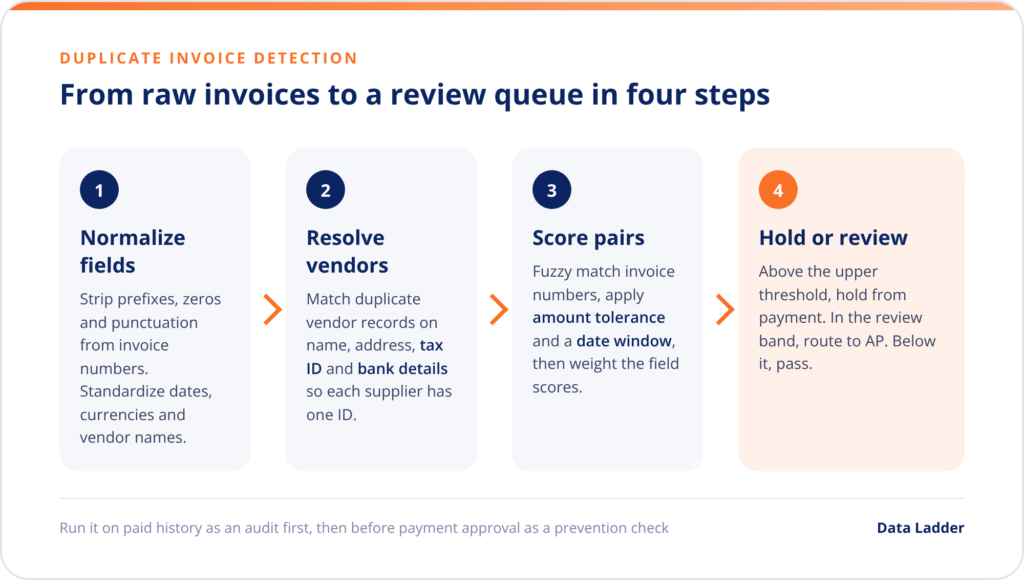
The combined score then goes through two thresholds. Pairs above the upper threshold can be barred from payment, while pairs in the band below it go to an AP reviewer, and the rest pass. Our guide to Jaro-Winkler similarity explains how fuzzy text scores behave on reformatted values like invoice numbers.
| Invoice A | Invoice B | Exact-match check | Fuzzy and numeric matching |
|---|---|---|---|
| INV-01043, Vendor 1022, $4,250.00, Mar 3 | 1043, Vendor 1022, $4,250.00, Mar 3 | Missed | Flagged, numbers match after normalization |
| 88213, Vendor 2047, $12,400.00, Apr 9 | 88213, Vendor 2047, $12,412.40, Apr 11 | Missed | Flagged, amount within 0.5% and date in window |
| 5521, Acme Industrial Supply, $980.00, May 2 | 5521, ACME Industrial Supplies Inc, $980.00, May 2 | Missed | Flagged, vendor records resolve to one supplier |
| INV-7710, Vendor 3310, $1,500.00, Feb 1 | INV-7742, Vendor 3310, $1,500.00, Mar 1 | Not flagged | Not flagged, monthly billing with different numbers |
Why exact-match duplicate invoice checks miss near duplicates
Most ERP duplicate checks compare a fixed set of fields, typically vendor, invoice reference, amount and invoice date, and flag a pair only when all of them agree exactly. That keeps false positives low. It also means one changed character in the invoice number, or one cent of difference in the amount lets the second invoice through.
| Near-duplicate type | Example | Why exact checks miss it |
|---|---|---|
| Reformatted invoice number | INV-0412 vs 412 | Reference field differs |
| Amount variance | $3,200.00 vs $3,216.00 after tax recalculation | Amount field differs |
| Re-dated resubmission | Same invoice sent again 20 days later | Date field differs |
| Cross-system re-entry | Keyed in the AP tool and again in the ERP | Records sit in separate systems |
| Duplicate vendor record | Same supplier under two vendor IDs | Vendor field differs |
Another thing that can add to the problem is that invoices can arrive from multiple different channels. The same invoice can arrive by email, through a supplier portal and as a line on a statement, each keyed by someone with different formatting habits. When an AP tool and the ERP both hold invoice records, a failed sync can put the same invoice in two systems that never compare notes.The duplicate vendor record is the hardest case. Every invoice under it looks legitimate on its own, so it has to be fixed in the vendor master rather than in invoice rules.
Clean the vendor master before tuning invoice rules
When one supplier exists as two vendor records, each record builds its own invoice history. Invoice-level checks compare invoices within a vendor, so the same invoice entered under both records is never compared, and no amount of threshold tuning will catch it. That’s why vendor master data cleansing comes before rule tuning in any plan to prevent duplicate payments.
Finding duplicate vendors uses the same matching logic on different fields. Fuzzy match vendor names after removing legal suffixes and punctuation, standardize addresses before comparing them, and compare tax IDs and bank details exactly, since agreement on either is strong evidence of a single supplier.
Merge confirmed duplicates into one golden vendor record and repoint open invoices to it. You can then run the same check at vendor onboarding, so a new record is compared against the existing master before it’s created. Our guides on what vendor matching software does and how to implement it cover this process in more detail.
Setting tolerances without flooding AP with false positives
Loose tolerances catch more duplicates, but they also flag invoices that are supposed to look alike. Rent, subscriptions and installments repeat the same vendor and amount every period, so for vendors that bill on a schedule, you should need an invoice number match or keep the date window shorter than the billing cycle so that there aren’t any incorrect matches.
Scale tolerance and review routing to invoice value. On small invoices, tight bands keep the review queue manageable and an occasional miss costs little. On large invoices, send every flagged pair to a reviewer, because one missed duplicate can outweigh months of review time.
The same rules can run in two modes. A duplicate payment audit scans one to three years of paid invoices and feeds duplicate payment recovery, while a prevention check scores each invoice before payment approval. Run the audit first, because the duplicates it finds show which vendors, channels and field differences drive your leakage, and that tells you where to set prevention thresholds.
How DataMatch Enterprise handles invoice and vendor matching
DataMatch Enterprise (DME) sets up each field’s comparison the way this article describes. Invoice numbers and vendor names use fuzzy matching, PO numbers and tax IDs use exact matching, and amounts use numeric matching with an absolute range or a percentage tolerance, scored with a linear falloff as the difference grows. Each field gets its own weight and threshold.
The vendor master usually comes first. DME standardizes vendor data, matches duplicate vendor records and merges them into golden records, using survivorship rules to decide which name, address and bank details to keep. The same match definitions can then run as a scheduled audit across invoice history, or through the REST API to check each new invoice before a payment run.
In Data Ladder’s 10-million-record benchmark, DME completed matching in about 41 minutes, producing 117,201 matched groups across 439,549 pairs. Across 15 comparative studies, it found 5 to 12% more matches than other enterprise data quality platforms.
Making duplicate invoice detection part of AP controls
Duplicate invoice detection works when invoice numbers are normalized, amounts and dates are compared with tolerance, and every supplier resolves to one vendor record. Exact-match checks still have a place, but they only catch the easy cases.
Clean the vendor master first, then audit paid history to learn your duplicate patterns. Move the same rules in front of payment approval, and review the thresholds against audit results every quarter so the review queue stays small.
To see what your own invoice and vendor data turns up, download the DataMatch Enterprise free trial and run it against a year of paid invoices.
Frequently asked questions
Short answers to the questions AP teams ask most when setting up duplicate checks.
How do you detect duplicate invoices?
Compare each invoice with invoice and payment history field by field. Normalize and fuzzy match invoice numbers, apply an amount tolerance and a date window, resolve vendors to one ID and match PO numbers exactly. Then hold or review pairs whose weighted score crosses your thresholds.
Can ERP systems catch duplicate invoices?
They catch exact duplicates. Built-in checks flag a pair only when a fixed set of fields agree exactly, so a reformatted invoice number, a small amount difference or a second vendor record lets a near duplicate through. Near duplicates need normalization and tolerance-based matching on top of the ERP check.
How much tolerance should invoice amount matching use?
Start tight, such as under 1% or a small fixed amount, and widen the band for high-value invoices that always go to review. Test the rules on paid history first, then adjust based on the true duplicates and false positives you find.
How do duplicate vendor records cause duplicate payments?
Each vendor record builds its own invoice history, and invoice checks compare invoices within a vendor. The same invoice entered under two records is never compared, so it can be paid twice until the duplicate vendors are matched and merged.