


































Introduction
Reliable data is essential for analytics, AI, customer operations, and digital transformation. Organizations therefore need data quality solutions that can profile, cleanse, standardize, match, and unify records across multiple sources.
DataMatch Enterprise (DME) is Data Ladder’s platform for data profiling, cleansing, standardization, matching, deduplication, and entity resolution. Organizations can use its established Windows desktop and server products or the new browser-based, API-first platform with REST APIs and Docker deployment on Linux in on-premises or cloud environments. This comparison examines DME alongside Trifacta Data Wrangler.
Quick Verdict
DataMatch Enterprise is the stronger fit when the primary requirement is configurable data matching, deduplication, entity resolution, survivorship, and golden-record creation. Organizations can choose established Windows desktop and server products or the new browser-based, API-first platform with REST APIs and Docker deployment on Linux.
Trifacta is better suited to visual, cloud-based data preparation, blending, and transformation workflows for analytics. The right choice depends on whether the priority is entity resolution and record consolidation or broader data preparation.
There is a frantic search for a data quality solution that can help businesses clean, sort, fix and unify their data. Moreover, the data quality solution should be flexible enough to allow the organization to maintain data quality in real-time while ensuring that security and data compliance standards are met. Data Ladder’s DataMatch Enterprise (DME) solution is a one-stop data quality solution that offers data profiling, data matching, data cleansing and much more.
This comparison sheet will compare Data Ladder’s DataMatch Enterprise with Trifacta’s Data Wrangler, a data cleaning and preparation solution.
Let’s get started.

Data Ladder vs. Trifacta Data Wrangler Enterprise
Trifacta was acquired by Alteryx in 2022, and its cloud-based data preparation technology became part of the Alteryx analytics portfolio. This comparison retains the Trifacta name because existing users and buyers may still use it when researching data preparation and matching alternatives.
Data Ladder also provides data transformation services but it is not limited to just data cleansing. It offers data matching as an essential solution that allows users to match data across disparate data sources to get a complete view of their information. Additionally, it also offers a full-fledged address verification feature that is not available in Trifacta.
We’ll begin the comparison by listing down common features offered by both solutions
Data Integration
As businesses continue to use new CRMs and apps, they will want a quality solution that connects directly to the data source.

DataMatch Enterprise (DME) connects to files, databases, CRMs, ERPs, and other enterprise systems. Its established Windows desktop and server products support self-contained data quality workflows, while the new browser-based platform adds REST APIs for integrating profiling, cleansing, matching, deduplication, and entity resolution with applications and data pipelines.
Supported sources include:
- Excel, CSV, delimited, and fixed-width files
- SQL Server, Oracle, Teradata, and other databases
- CRM and ERP systems
- ODBC-supported data sources
- JSON and XML services
Trifacta supports most major Big Data and relational data sources but lacks connectivity with most CRMs, social media platforms, and enterprise applications.
Data Profiling
The primary goal of data profiling is to provide an overview of the problems within the data set. For example, incomplete addresses, invalid phone numbers, ZIP codes with letters etc are data quality issues that are highlighted during the profiling process.

- Identify which of your lists have irregularities or oddities.
- Gives a confidence score to each of your fields.
- Statistics on your dataset’s size, median, mean, average, standard deviation, etc.
- Tailor-made expressions that let you sort data over 19 different fields.
- Create custom expressions using a Pattern Builder option.
- View all your profile history changes.
- Visual data exploration to help you see your audience clusters.
- Identify nicknames from a pre-defined dictionary of nicknames.
The new web-based DataMatch Enterprise also makes these profiling capabilities available through browser workflows and REST APIs, allowing profiling results to be incorporated into applications and data pipelines.
Trifacta’s data profiling is quite basic and does not have advanced features such as the ability to create customized expressions to sort your data according to your preference. For instance, with DME, you get pre-built expressions that let you sort your data on the basis of credit cards, gender, email addresses, websites, and other important fields.
- Statistics such as the dataset’s size, distribution, quality, distinct values, median, mean, quartiles, average, and standard deviation, to name a few.
- Percentage of valid, mismatched, and empty values in your results file.
- Number of columns in your results file.
- Number of rows in your results file.
- The ID of your result file.
- The data source that was used to generate your results file.
Data Cleansing
Data fields with inaccurate spellings, case settings, and other structural problems need to be cleansed by fixing the inconsistencies. Ideally, this needs to be done right within the data source so that errors are nipped in the bud.

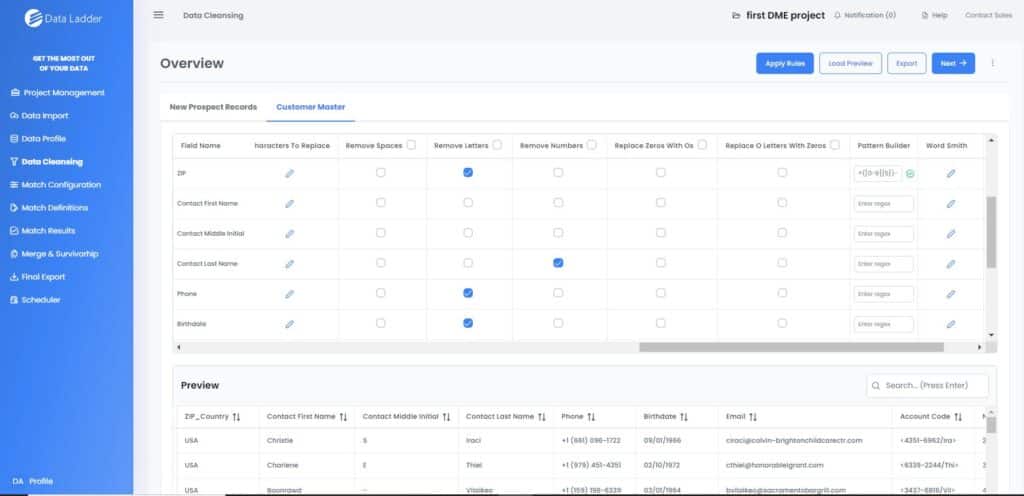
DME has a full-fledged data cleansing and standardization system that allows users to:
- Change cases and ensure that each field follows a defined standardization.
- Find and replace different characters.
- Choose whether you want to preserve abbreviations.
- Set your own exceptions.
- Choose a delimiter that separates your fields such as tabs, commas, semicolons etc.
- Remove spaces, numbers, letters, non-printable characters, zeros, and zeroes with letters.
DataMatch Enterprise also includes WordSmith for standardizing names, addresses, and other recurring terms using configurable replacement and removal rules.
For data cleansing, Trifacta follows a six-step process that sums up all the features discussed above. Trifacta, being a data preparation solution focuses on multiple aspects of data cleansing. It allows users to standardize data and remove or correct inaccurate records.
 Discovering: Gives an overview of the data.
 Structuring: Formats the data to be used in traditional applications.
 Cleaning: Removes data that may distort analysis and standardizes it into a single format.
 Enriching: Augment the data with internal or third-party data to enhance the data for better analysis.
 Validating: brings data quality and inconsistency issues to the surface so the appropriate transformations can be applied.
Data Matching
DataMatch Enterprise is purpose-built for matching records within and across multiple data sources. Users can configure exact, fuzzy, phonetic, and numeric matching rules, review potential matches, and apply survivorship criteria to create consolidated master records.
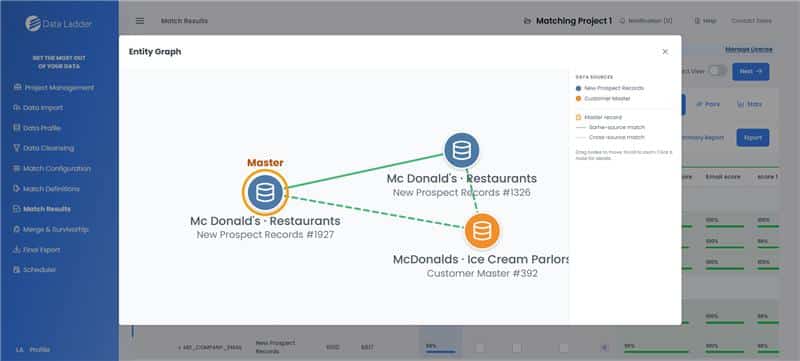
The new web-based platform extends these capabilities through REST APIs, Entity Graphs, and Live Search. In controlled internal testing, it completed a configured matching process on a 10-million-record dataset in approximately 41 minutes. This was not a head-to-head benchmark against Trifacta, and results will vary by data, rules, hardware, and deployment environment.
This cross-source matching is particularly useful for government and public-sector teams reconciling records across agencies, jurisdictions, and programs.
DataMatch Enterprise’s data matching allows you to:
- Define how you want to match data sources using four options – all, none, between and within. All look for matches between each data source as well as matches within each data source. If you don’t want to do all, you can just choose between or within to look for duplicates between data sources or within data sources.
- Choose the fields you want to map by the fields of your data list.
- Run multiple matching sessions simultaneously.
- Get matches based on exact, phonetic, numeric and fuzzy matching techniques.
- View match results and create a Master Record that you can use as a surviving record.
- Save and export your results for later review.
- Use a merge and survivorship option to overwrite data based on your criteria.
DME is specifically dedicated to providing a flexible data matching solution that gives the user the ability to do much more than just basic matching.
Features in DME that are Not Available in Trifacta
Being a data transformation solution, Trifacta is a great software for companies that want an easy-to use, easy-to-access, web-based solution. However, Trifacta lacks some core features offered by Data Ladder.
Let’s take a look at features that are not available in Trifacta:
On-Premises Solution:
DataMatch Enterprise is primarily an on-premises solution. It can be deployed on a company’s own server and can be used behind your firewall. This ensures safety, security and complete control over your data assets.
Trifacta is purely a cloud-based solution that caters to organizations using Google Cloud, AWS or Azure as their cloud platforms. Trifacta’s Data Wrangler Enterprise is a web-based solution that uses an API framework enabling users to access live data without requiring them to pre-load or create a copy of the data separate from the source data system. This framework includes connecting to various Hadoop sources, Cloud services, Files (CSV, TXT, JSON, XML, etc.) and relational databases.
While it is true that some things are easier to administer through the cloud, security is not one of them. By its very nature, security is something most organizations will want to keep in-house rather than turning over confidential data (even if encrypted) to a cloud provider.
DataMatch Enterprise supports multiple deployment models. Its established Windows desktop and server products can operate within an organization’s environment and behind its firewall. The new browser-based platform supports Docker deployment on Linux in on-premises or cloud environments, while REST APIs connect its data quality and entity resolution workflows with other applications and pipelines.
These options allow organizations to choose a deployment model based on their infrastructure, security, data-control, and user requirements.
Compliance framework and offerings include but are not limited to:

CSA Star Attestation

ISO/IEC 27001

FISC

UK G-Cloud

CSA Star Certification

ISO 9001

EU Model Clauses

SOC 1 & SOC TYPE 2 Report

ISO IEC 27018

PCI DSS

EU-US Privacy Shield

SOC Type 3

HIPAA/ HITECH Compliance
Address Verification
DataMatch Enterprise is a CASS-certified address verification and validation solution that lets users verify address fields against government databases like the USPS and Canada Post among others. This feature is a “must-have” if you need to clean a mailing list. There are 54 fields according to which you can match, verify, and validate your address. From checking 5-digit zip codes to identifying street names to longitude and latitude fields, you have a wide range of address validation fields to use.

Survivorship and Enrichment
Once you have performed the cleansing, matching, and fixing of your records, you might want to save that master record and keep it as the central record. DME allows for data survivorship and data enrichment where you can decide what record you will use to overwrite, determine master record or merge data. The merging of data allows you to create a complete master record. This is pretty handy if you have customer info dispersed over several platforms or channels. With this option, you can merge specific fields of those other data sources and create a complete picture of your customers.
Entity Graphs and Live Search
The new web-based DataMatch Enterprise includes Entity Graphs for visualizing connections among resolved records and Live Search for searching large datasets and investigating potential matches. These capabilities help users explore related entities and review matching results before creating or exporting master records.
Final Export
What do you eventually do with the duplicates? With the final export option, you can export all of the records from your data sources and create a column for the match group ID in order to flag the matches and duplicates. The final export option lets you create a master record for each group of duplicates. Additionally, you can also choose to export duplicates only or use a cross-reference to export the results that have similar values in a cross-column format.
Whereas Trifacta allows you to Publish results on only major analytics and BI systems, rather than offering you the flexibility to choose exactly what part of the results to export, how to do so, and in which format.
Scheduler for Automating Data Cleansing and Matching
DataMatch Enterprise supports automated data quality workflows through scheduling and API integration. Its established products can run profiling, cleansing, and matching projects at scheduled times, while the new web platform’s REST APIs allow applications and data pipelines to initiate these processes programmatically.
DataMatch Enterprise Vs. Trifacta Data Wrangler

| DataMatch Enterprise | Trifacta Data Wrangler |
|---|---|
| Exact, fuzzy, phonetic, and numeric matching | Focused primarily on data preparation and transformation |
| Offers data matching as a key feature along with other data quality operations. | Matching capabilities depend on the Alteryx product and workflow |
| Windows desktop/server plus web, on-premises, and cloud deployment | Deployment options vary across Alteryx products and editions |
| Profiling, cleansing, matching, deduplication, survivorship, and enrichment | Supports preparation, cleansing, blending, and transformation |
| Prebuilt and configurable data quality rules | Provides guided and reusable transformation workflows |
| Includes WordSmith for parsing and standardization | Provides visual parsing, cleansing, and transformation tools |
| Has a CASS certified Address Verification system that gives the user flexibility to add government databases and dictionaries for address verification. | Address-verification availability depends on product and integrations |
| Designed for data quality, matching, and entity resolution | Designed primarily for cloud data preparation and analytics workflows |
| Predictable licensing based on deployment and requirements | Pricing varies by product, edition, and deployment |
Making the Choice Between Data Ladder and Trifacta
DataMatch Enterprise is designed for organizations that need to profile, cleanse, standardize, match, deduplicate, and consolidate data across multiple systems. Teams can use its established Windows desktop and server products or deploy the new browser-based, API-first platform through Docker on Linux in on-premises or cloud environments. This makes DME a focused option when matching, entity resolution, and golden-record creation are central requirements.

Trifacta’s Data Wrangler is primarily a cloud-based data preparation tool that allows users to prepare, clean and standardize data without the need for on-premises software. It is ideal for users who want a data preparation solution for improving their marketing or customer data. It is not an ideal solution for businesses that want a complete data matching solution along with data cleansing and data enrichment operations.
DataMatch Enterprise enables users to:
- Connect files, databases, CRMs, ERPs, and ODBC-supported sources
- Profile, cleanse, and standardize data through visual workflows
- Match and deduplicate records within and across multiple sources
- Configure exact, fuzzy, phonetic, and numeric matching rules
- Review matches and create master records using survivorship rules
- Verify and standardize address data
- Automate workflows through scheduling or REST API integration
- Choose Windows desktop/server or Docker-based Linux deployment
- Investigate resolved records using Entity Graphs and Live Search
Additional Features of Data Ladder
Data Ladder has served more than 4,000 customers, including over 500 enterprise customers, across government, financial services, healthcare, education, retail, and other industries. Published customer reviews frequently highlight DataMatch Enterprise’s ease of use, match-result review, responsive support, and ability to cleanse and reconcile data from multiple sources.
User Reviews: Data Ladder vs.Trifacta
“User-friendly, but lacks key features such as debugging, quick exploratory analysis/joins.”
“Great tool, but hard to figure out new processes if you don’t already know how to do them.”

“Currently, Trifacta does not allow the ability to write data back to a Postgres-based RDBMS system. This causes us to need to perform additional steps outside of Trifacta to import and export data to their source and target systems.”
DataMatch Enterprise is designed for business users, data stewards, and technical teams. Its established desktop and server products provide visual, code-free workflows, while the new web platform adds a browser-based interface and REST API integration for developer-led applications and data pipelines.
“DataMatch Enterprise is easy tolearn and use. It’s easy to review results. Saves us tons of time in manually checking records.”
“I like that it is very straightforward and easy to use. With very little training, we had it up and running.”
“This program is far more effective, user-friendly and reasonable than many other data cleansing programs I checked out prior to making my purchasing decision and their customer service is really great.”
“I like the ease of use for this program when matching data from Access tables to confirm how successful our business practices are”
When using Data Ladder software, customers especially liked the following:
- The modern, highly intuitive, code-free interface.
- Extremely responsive and helpful support.
- Flexible creation of data quality rules for both business and IT users.
- Very easy to review result and see their data as it transforms.
- Straightforward setup – very little training required to get started.
- The ease of integrated data sources across the enterprise.
Conclusion
DataMatch Enterprise is the stronger fit when the primary requirement is data profiling, cleansing, matching, deduplication, entity resolution, survivorship, and master-record creation. Organizations can choose established Windows desktop and server products or the new browser-based platform with REST APIs and Docker deployment on Linux.
Trifacta is better suited to broader data preparation, transformation, and analytics workflows. The products may also complement one another, with Trifacta preparing data and DataMatch Enterprise resolving duplicates and entities before records enter analytics, CRM, or master data systems.
.

Frequently Asked Questions
What is the difference between Data Ladder and Trifacta?
DataMatch Enterprise is a focused data quality and entity resolution platform for profiling, cleansing, matching, deduplication, survivorship, and golden-record creation. It is available through established Windows desktop and server products and a new browser-based, API-first platform with Docker deployment on Linux.
Does Trifacta provide enterprise-grade data matching and deduplication?
Trifacta excels at data transformation and preparation (e.g., restructuring, cleansing, standardizing fields), but it does not offer specialized entity matching, scoring, and merge workflows on its own. Data Ladder is purpose-built for these advanced matching tasks.
When should I use Data Ladder vs. Trifacta?
Use Data Ladder when the priority is accurate matching, deduplication, entity resolution, and unified master data creation. Use Trifacta when the focus is on data preparation, cleaning, reshaping, and analytics readiness — especially within data pipelines for BI or machine learning workloads.
Can Data Ladder and Trifacta be used together?
Yes. Organizations use Trifacta to prepare and standardize data (e.g., format normalization, cleansing) and then hand that data off to Data Ladder for deduplication and entity resolution before analytics, CRM loading, or master data management.
Is Data Ladder suitable for high-volume and large datasets?
Yes. DataMatch Enterprise supports high-volume batch and API-driven matching workflows. In controlled internal testing, the new web platform completed a configured matching process on a 10-million-record dataset in approximately 41 minutes. This was not a head-to-head Trifacta benchmark, and results will vary according to the data, matching rules, hardware, and deployment environment.
How does Data Ladder handle explainability in matching compared to Trifacta?
Data Ladder provides transparent match scoring, field-level similarity insights, and review workflows that help users understand why records were matched, merged, or kept separate. Trifacta focuses on transformation logic rather than match decision explainability.
Does Data Ladder use AI or large language models (LLMs) in its matching workflows?
Data Ladder does not use AI or LLMs in its matching workflows, but it employs advanced pattern matching, fuzzy logic, and configurable algorithmic rules to ensure accurate results, even at scale.
Which solution is more user-friendly for business analysts?
Data Ladder is designed with visual workflows, no-code matching configuration, and built-in review dashboards that empower data stewards and analysts. Trifacta also offers a visual interface focused on data preparation and cleaning.
Can Data Ladder integrate with data lakes, warehouses, and analytics pipelines?
Yes. DataMatch Enterprise can participate in data lake, warehouse, and analytics workflows through supported files, databases, and ODBC connections. The new web platform adds REST APIs for integrating profiling, cleansing, matching, deduplication, and entity resolution with applications and data pipelines.
Which tool is better for building trusted master data sets?
For trusted master data creation with deduplication and identity resolution, Data Ladder is purpose-built with scoring, merge logic, survivorship rules, and audit trails. Trifacta supports data shaping but requires additional tools for full master data workflows.
Can DataMatch Enterprise be deployed on premises or in the cloud?
Yes. DataMatch Enterprise supports established Windows desktop and server deployments as well as a new browser-based platform. The web platform uses Docker on Linux and can be deployed in on-premises or cloud environments, allowing organizations to choose the model that fits their infrastructure and data-control requirements.
What do Entity Graphs and Live Search do in DataMatch Enterprise?
Entity Graphs visualize connections among resolved records, while Live Search helps users search large datasets and investigate potential matches. Both capabilities are available through the new web-based DataMatch Enterprise platform.