



































Last Updated on September 7, 2026
DataMatch Enterprise just shipped a REST API, a containerized deployment, and a rebuilt matching engine. In internal testing, the new engine matched 10 million records in about 41 minutes, a scale the previous desktop application couldn’t process at all.
None of it replaces the interface your team already uses. It runs alongside it.
That matters because most data quality platforms pick one audience and stop there. A no-code interface serves the person reviewing matches by hand. A REST API serves the person integrating matching into a pipeline. Few platforms do both on the same engine. This release is built to close that gap.
What’s New in DataMatch Enterprise
The new release of Data Match Enterprise comes with a new interface, new deployment style, and works with your existing architecture. Here’s a closer look at what we’re shipping:
A REST API That Works With Any Stack
The previous DataMatch Enterprise API was built exclusively for .NET, which meant real integration was only practical for teams already working inside the Microsoft ecosystem. Everyone else had just three options: build and maintain a .NET bridge service just to reach the matching engine, run jobs manually and move files by hand, or skip the tool and write matching logic from scratch.
The new REST API removes that constraint. Any language or framework capable of making an HTTP request, including Python, Java, Node, and Go, can call matching, profiling, and data preparation directly. Matching becomes a step inside an existing pipeline instead of a separate task someone has to run and hand off.
Docker-Based, Platform-Agnostic Deployment
DataMatch Enterprise now ships as a container. It runs on Linux, on-premises infrastructure, or in the cloud, deployed and scaled through standard container tooling. Before this release, running the application meant installing an executable on a Windows machine, one installation per user. That constraint shaped how teams could deploy the platform as much as any single feature did.
Entity Graphs for Visual Match Review
Match results used to come back as a flat list of pairs. Understanding how a large or chained group of records ended up together meant reconstructing the relationships by hand from a spreadsheet. Entity graphs replace that with an interactive visual view. A matched group renders as a network of connected records, so a reviewer can see the shape of a match, spot over-linking, and validate a group on sight instead of tracing rows across a table.
Live Search for Point-in-Time Lookups
Not every question needs a full matching job. Checking whether a single record already exists in a dataset used to require the same setup and runtime as processing the entire file. Live search answers that kind of question immediately, matching in real time at up to 200 records a second, without configuring or running a batch job first.
Profiling Export
Profiling results can now leave the platform. A data quality manager can export findings and attach them to a report, or hand them to a team that doesn’t use DataMatch Enterprise directly, something the previous version didn’t support at all.
The Matching Engine Got Rebuilt Too
The interface and deployment changes get most of the attention, but the matching engine underneath changed just as much. Two matching types were rebuilt from the ground up, and two more capabilities were extended.
Numeric Matching: Range-Based and Percentile-Based
Numeric matching compares values like amounts, quantities, or measurements to determine whether they refer to the same underlying record, rather than relying on an exact character match. DataMatch Enterprise now supports range-based matching, which allows values within a defined tolerance, and percentile-based matching, which compares values relative to their distribution.
Earlier, teams either excluded numeric matching from matching entirely or treated them as text, which behaves poorly for anything numeric. Both new algorithms give numeric fields, including amounts, quantities, and identifiers, a reliable way to match without that workaround.
Phonetic Matching: Exact and Fuzzy
Phonetic matching compares how values sound rather than how they’re spelled, which matters most for name data where spelling variation is common. DataMatch Enterprise now splits this into phonetic exact, which matches records with identical phonetic encodings, and phonetic fuzzy, a custom algorithm built to catch name variants that differ in both spelling and sound while still referring to the same person.
Name-heavy datasets were previously the most likely place for phonetic matching to miss a real match or flag a false one. This rebuild targets that gap directly.
Enhanced Cross-Column Matching
Cross-column matching now gives more control over how fields compare against each other when data is structured inconsistently across sources, a common problem whenever two systems capture the same information in different columns.
A Redesigned Interface
The application was rebuilt around how a matching project actually moves: import, configure, review, export. Navigation and configuration options are surfaced where they’re needed instead of spread across nested dialogs, which shortens the learning curve for a new user and cuts the repeated steps an experienced one takes on every project.
The Numbers: Legacy App vs. New Web App
To see what the rebuilt engine does at scale, the same test file was run through the legacy desktop application and the new web platform, on the same machine.
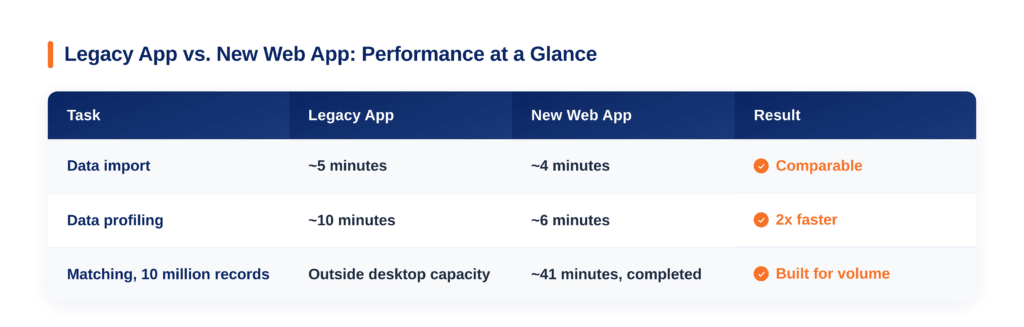
Accuracy is a separate, longstanding benchmark. Independent testing across 15 comparative studies has found DataMatch Enterprise returns 5 to 12 percent more matches than other enterprise data quality platforms, with matching accuracy up to 99 percent. The rebuilt engine’s internal testing showed a lower false positive rate than the legacy version specifically, meaning fewer incorrect matches reach a reviewer in the first place.
What This Means for Different Teams
The additions above land differently depending on what someone’s actual job is. Here’s how each group is likely to use them.
Data Engineers and IT Directors
For anyone responsible for integration and deployment, this release removes the two biggest structural constraints of the previous version. Matching can now run inside a pipeline instead of as a separate manual step, and the platform can be deployed anywhere a container runs instead of only on individual Windows machines.
Data Quality Managers and Stewards
Nothing about the daily review workflow changes, but two additions make it faster. Entity graphs turn an ambiguous match group into something visible instead of inferred, and live search answers one-off questions without a full job. Profiling export means findings can leave the tool without a screenshot.
CDOs and Data-Accountable Business Leaders
The rebuilt engine’s accuracy and speed improvements translate directly into fewer person-hours spent on manual review and faster time to a trustworthy dataset, without adding infrastructure most teams don’t already have. A Docker-capable environment is a considerably lower bar than a dedicated MDM deployment.
New to DataMatch Enterprise?
Try Data Ladder on your own data to see how it supports matching, deduplication, and entity resolution across complex systems.
Start a Free TrialAlready a customer? This release is available now. Your account team can confirm rollout and deployment details specific to your environment.
Frequently Asked Questions
What’s the biggest change in this DataMatch Enterprise release?
Two changes define this release: a standard REST API that replaces the previous .NET-only version, and a Docker-based deployment that runs on Linux, on-premises servers, or in the cloud instead of requiring a Windows installation. Together they mean DataMatch Enterprise can now be reached programmatically and deployed outside a single operating system, without losing the no-code interface the platform has always had.
Does DataMatch Enterprise still have a no-code interface, or is it API-only now?
Both. The REST API runs on the same matching engine as the interface, so adding programmatic access doesn’t require giving up the UI, and using the UI doesn’t block a team from also calling the API. That’s different from most competing platforms, which tend to offer one or the other.
Does entity resolution in DataMatch Enterprise persist across runs, the way it does in some competitor platforms?
Not currently. Entity graphs in this release are a visual review tool for a specific matched group, generated per run, rather than a persistent identity graph maintained across every batch the way some enterprise MDM platforms handle entity resolution. Teams that need a continuously updated identity graph across systems should evaluate that requirement specifically.
How much faster is the new version of DataMatch Enterprise?
In internal testing on a 10 million record file, data profiling completed about twice as fast as the previous desktop version, and the full matching job completed in about 41 minutes, a scale the legacy desktop architecture could not process in the same test.
Is the new REST API available for existing DataMatch Enterprise customers?
Yes. This release is available now, and existing customers can confirm rollout and deployment details for their specific environment through their account team.
If your team has hit the limits of the previous version, whether that’s a Windows-only install, an API that only spoke .NET, or a matching job that couldn’t handle your largest dataset, start a free trial and see what changes. No credit card required.