





































Data cleansing software

Our data cleansing tool is feature-rich solution that helps you to eliminate inconsistent and invalid values, create and validate patterns, and achieve a standardized view across all data sources, ensuring high data quality, accuracy, and usability.

data cleansing & standardization

Trusted By

Trusted By

solution by feature

DEFINiTION

What is a data cleansing tool?

A data cleansing tool is a solution that helps eliminate incorrect and invalid information from a dataset, and achieve a consistent and usable view across all data sources. Some common data cleansing and standardization activities include:

  • Removing and replacing empty or garbage values,
  • Parsing aggregated columns to identify smaller sub-components,
  • Transforming letter cases,
  • Merging the same or similar columns together to avoid duplicates,
  • Transforming values to follow the correct pattern and format,
  • Flagging, replacing, or eliminating the most repetitive words in a column to remove noise in bulk.

Benefits

Why do you need a data cleansing tool?

Keep your data error-free

Remove missing, incomplete, and invalid values to avoid major roadblocks in the execution of business processes.

Preserve data usability

Presence of data doesn’t guarantee data usability; improve data adaptability with a clean and standardized dataset.

Benefit from data-driven initiatives

Make the best decisions for your business by using clean and reliable data sources and gain true business insights.

PRIVATE

Ensure data compliance

Ensure that your data management strategies comply to data compliance standards, such as such as GDPR, HIPAA, CCPA, etc.

Improve brand loyalty

Perform CRM data cleansing and leverage accurate information to offer personalized experiences to customers.

Stay relevant and up-to-date

Run quick data quality checks with an easy-to-use and inexpensive data cleansing tool for staying relevant and up-to-date.

Features

What DME’s data cleansing tool can do for you?

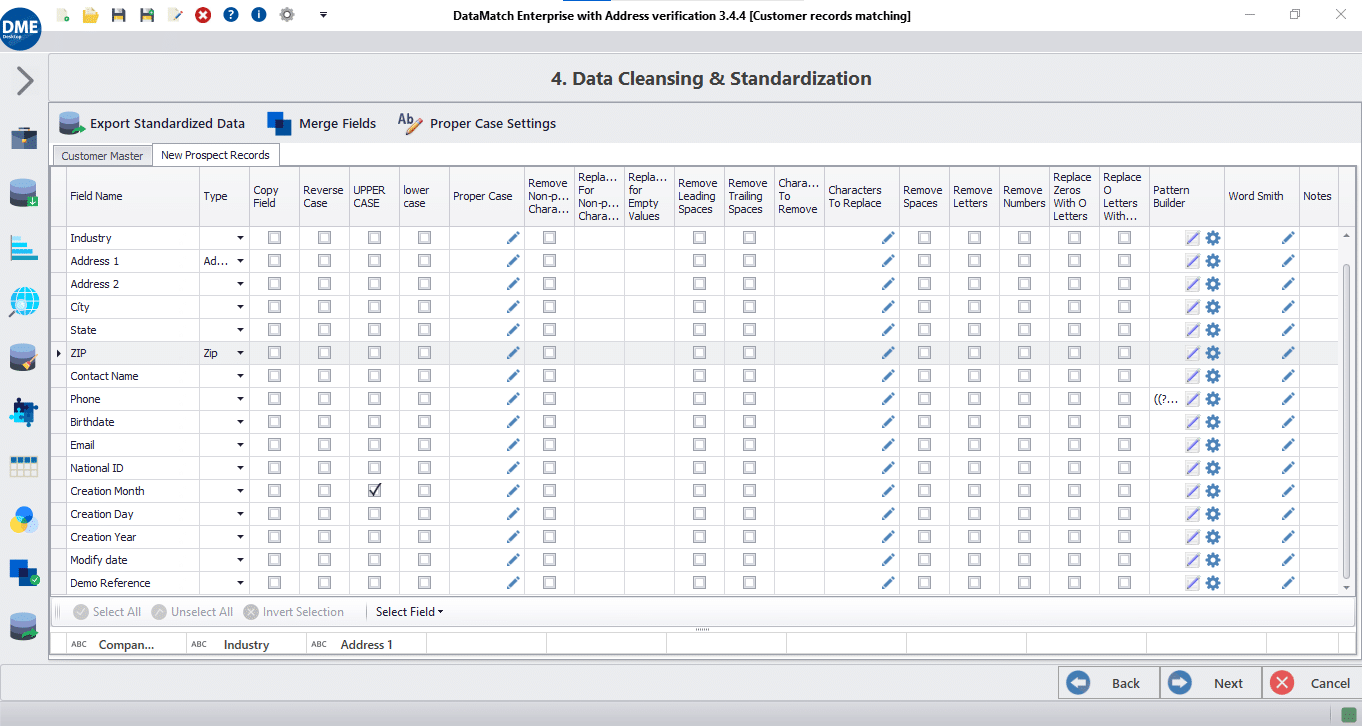
With DME’s data cleansing tool, you can remove or replace empty values, leading and trailing spaces, specific letters or numbers, non-printable characters, and more.
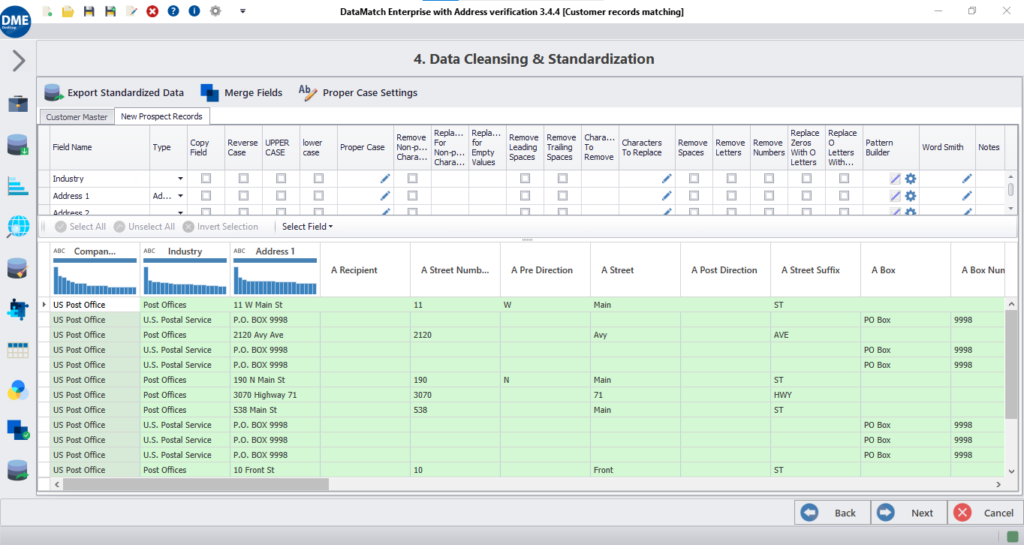
Run data fields against a dictionary of words to identify its sub-data elements (such as Street Name and Number for Address), and merge columns to follow custom-created formats.
DME offers various features for transforming cases of letters in strings, ensuring a consistent and standardized view across all data sources.
Use DME’s extensive pattern library while data profiling and data standardization. It offers the ability to identify valid and invalid values, as well as transform data fields to follow a defined pattern (a technique widely used for masking personally identifiable information (PII)). DME also offers a visual, drag and drop regex designer for creating custom patterns.
With DME’s wordsmith tool, you can fetch the most repetitive words occurring in a data field, and decide to flag, replace, or delete certain words to achieve standardization, and prepare data for matching and deduplication.

There’s more

What else do you get out of the box?

Our data cleansing solution comes with a number of in-built features that facilitate easy, automatic, and cost-effective data cleansing operations at any time.

User roles

A tool made for everyone

Data analysts

Business users

IT Professionals

Novice users

Features

We take care of your complete DQM lifecycle

Import

Connect and integrate data from multiple disparate sources

Profiling

Automate data quality checks and get instant data profile reports

Cleansing

Standardize & transform datasets through various operations

Matching

Execute industry-grade data match algorithms on datasets

Deduplication

Eliminate duplicate values and records to preserve uniqueness

Merge & purge

Configure merge and survivorship rules to get the most out of data

Want to know more?

Check out DME resources

Merging Data from Multiple Sources – Challenges and Solutions

Oops! We could not locate your form.

What Is Data Matching and Why Does It Matter?

Last Updated on February 27, 2026 Written by Data Ladder’s data quality team, drawing on 15+ years of experience helping enterprises match and deduplicate datasets

Frequently asked questions

Got more questions? Check this out

DataMatch Enterprise offers a unique Wordsmith tool that profiles columns for the most repetitive words and enables bulk removal or replacement eliminating noise like “LLC,” “Inc.,” or “Corporation” across entire datasets instantly. The platform includes a visual, drag-and-drop Pattern Builder for creating custom validation rules using Regular Expressions, capabilities not available in basic cleansing tools. DME provides instant data preview showing transformations in real-time as you apply cleansing functions, and integrates seamlessly with profiling, matching, deduplication, and merge-purge in a single workflow without requiring data exports between tools.

DataMatch Enterprise delivers enterprise-grade cleansing capabilities with a code-free, visual interface that business users can operate independently, while Informatica and Talend require technical expertise, ETL development, and IT involvement. DME deploys in minutes and processes data locally on your machine, ensuring data security without cloud uploads, whereas enterprise platforms often require weeks of configuration and infrastructure setup. The integrated approach means profiling insights feed directly into cleansing operations, and cleansed data flows immediately to matching and deduplication – eliminating the complex data pipelines and multiple tool integrations required by enterprise platforms.

DataMatch Enterprise supports comprehensive cleansing operations including: removing and replacing empty values, leading/trailing spaces, specific characters, and non-printable characters; parsing aggregated columns using word dictionaries to identify sub-components (like separating Street Name and Number from Address fields); transforming letter cases with multiple standardization options; merging similar columns to eliminate duplicates; building and validating custom patterns using RegEx; and bulk word management through the Wordsmith tool. The instant preview feature shows transformations live across multiple windows, allowing you to verify changes before applying them permanently.

Yes, DataMatch Enterprise includes sophisticated parsing capabilities that run data fields against built-in dictionaries of words to identify sub-data elements. For example, it can automatically separate full names into first, middle, and last names, or parse complete addresses into Street Number, Street Name, City, State, and ZIP Code components. The parsing engine uses intelligent pattern recognition to handle variations and formats commonly found in real-world data. This automated parsing eliminates hours of manual field splitting and ensures consistent data structure across your datasets.

Yes, DataMatch Enterprise features instant data preview that shows transformations in real-time as you apply cleansing functions. Unlike tools requiring you to execute operations before seeing results, DME displays live previews across multiple windows, allowing you to verify changes column-by-column before committing them. This visual feedback prevents costly mistakes and enables iterative refinement of cleansing rules. The preview capability works across all cleansing operations removals, replacements, parsing, case transformations, and pattern validation -providing confidence that your data will be cleansed exactly as intended.

The Wordsmith tool is a specialized feature unique to DataMatch Enterprise that profiles any data column to identify the most repetitive words and their frequency counts. You can then flag, replace, or delete these words in bulk across the entire column dramatically improving cleansing efficiency. For example, when standardizing company names, Wordsmith can identify all instances of “LLC,” “Ltd.,” “Incorporated,” “Corp.,” etc., and remove or standardize them in one operation rather than hundreds of individual edits. This bulk word management capability is especially powerful for removing noise, standardizing terminology, and preparing data for matching operations.

DataMatch Enterprise includes an extensive pattern library for common data types (email addresses, phone numbers, Social Security Numbers, dates, ZIP codes) plus a visual drag-and-drop Pattern Builder for creating custom Regular Expression patterns. The tool can identify valid versus invalid values based on these patterns and transform data to follow defined formats, a technique widely used for masking personally identifiable information (PII) to ensure compliance with regulations like GDPR, HIPAA, and CCPA. Pattern validation capabilities exceed basic cleansing tools that only offer simple find-and-replace operations, providing the precision needed for regulated industries.

DataMatch Enterprise manages the complete data quality lifecycle in a single platform: Import → Profile → Cleanse → Match → Deduplicate → Merge & Purge. Profiling results identify which fields need cleansing and what operations to apply, cleansed data flows directly to matching algorithms without exports, and cleansing rules can be saved and reused across projects. This integrated workflow eliminates the tool switching, data handoffs, and manual process steps required when using separate cleansing, profiling, and matching tools. Organizations achieve faster time-to-value and maintain data lineage throughout the entire quality improvement process.