




































Last Updated on April 23, 2026
According to Gartner, poor data quality costs the average enterprise $12.9 million per year. In an ERP environment, where data actively triggers payment runs, inventory replenishment, financial reporting, and customer transactions, that cost is not abstract. It shows up in reconciliation failures, compliance gaps, and operational rework, making teams spend time on unnecessary tasks and resolutions.
Most organizations invest heavily in platform selection, configuration, and change management, yet still encounter serious problems in the months after the ERP solution is live. When those problems are traced back, most organizations discover that their data either wasn’t prepared properly or that data quality isn’t given as much attention as it deserves.
The thing with poor data quality in an ERP is that it does not stay contained to the system that holds it. It moves downstream into every process the ERP supports, from procurement decisions made on inaccurate inventory records and financial statements built on duplicate customer accounts to supplier payments processed against outdated vendor data. The damage accumulates quietly until it becomes visible in a reconciliation that will not close or a report that no one trusts.
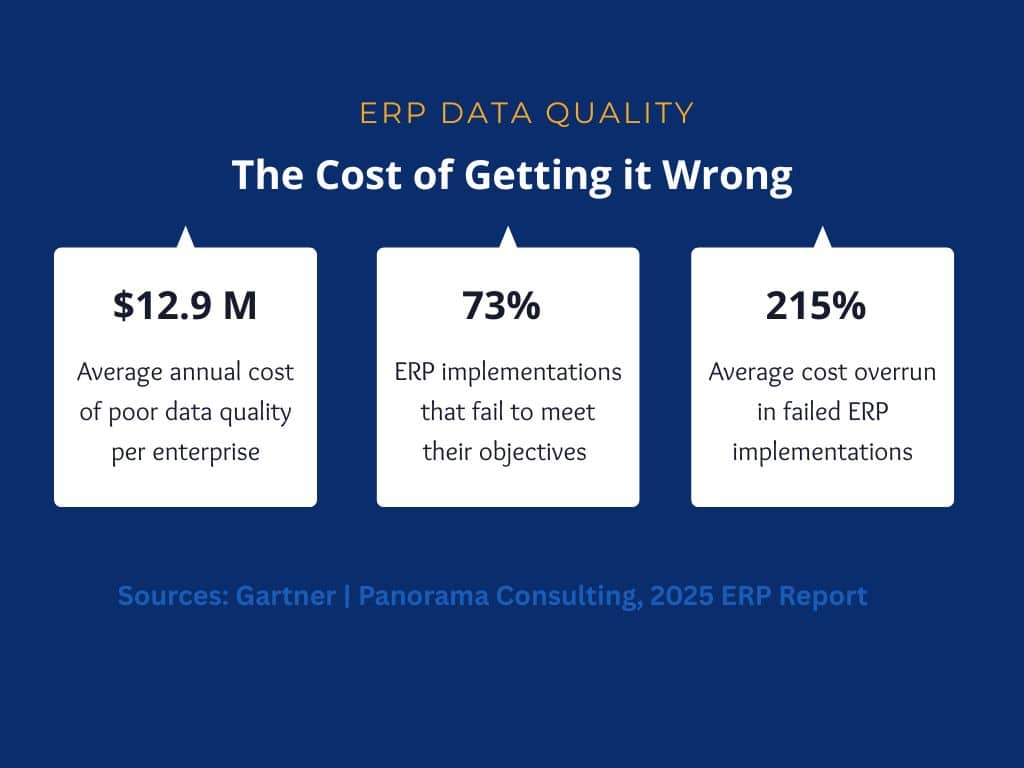
To put things in perspective, research from Panorama Consulting’s 2025 ERP Report found that inadequate data preparation consistently ranks among the top three causes of ERP implementation failures, with 73% failing to meet their objectives in discrete manufacturing environments alone. The question most implementation teams ask too late is not whether their platform can handle their processes, but whether their data is ready to support them.
This blog covers what ERP data quality means in practice, the specific issues that appear in real implementations, how to address them before and after go-live, and where Data Ladder fits into that process.
What Is ERP Data Quality?
ERP data quality refers to the accuracy, completeness, consistency, timeliness, validity, and uniqueness of the data flowing through an enterprise resource planning system. Unlike an analytics dashboard or a reporting tool, an ERP uses data to execute business processes. This can mean different things in different departments. A new vendor record may trigger a payment run, a sale record may drive inventory replenishment, and website visitor data may influence what is presented to the end user. Even if any of these records contain incorrect data, they may still trigger processes that yield inaccurate results.
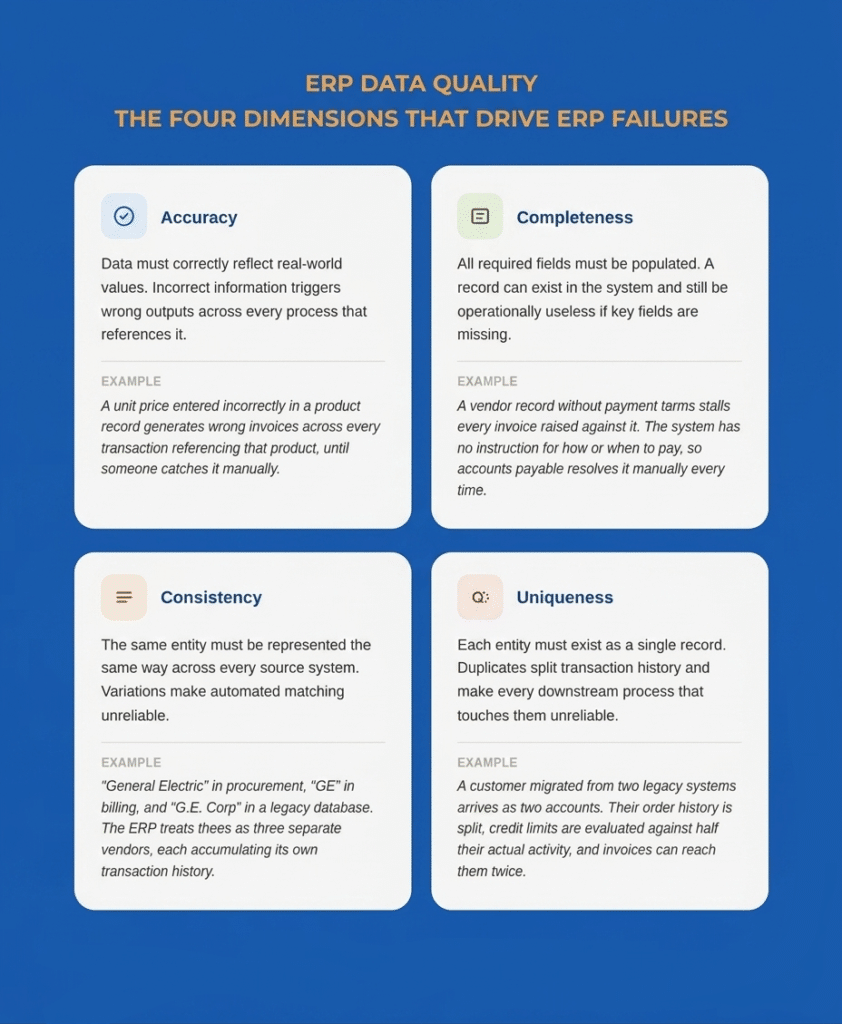
ERP failures are generally driven by four major factors:
- Accuracy: The data in your ERP systems must correctly reflect reality. Any information needs to be accurate and up to date since incorrect information can cost companies millions in marketing activities and cause overruns in dozens of other processes.
- Completeness: All required fields need to be populated for the ERP to function correctly. A record can exist in the system and still be operationally useless if key fields are missing. For instance, a vendor record without payment terms will stall every invoice raised against it because the system has no instructions on how or when to pay.
- Consistency: The same entity should be represented the same way across every system feeding into the ERP. When it isn’t, the ERP has no reliable way to determine that two records refer to the same real-world entity. A supplier that appears as “General Electric” in the procurement system, “GE” in the billing platform, and “G.E. Corp” in a legacy database will be treated as three separate vendors. Each will accumulate its own transaction history, its own payment records, and its own contact details, rendering analyses unreliable.
- Uniqueness: Each entity should exist as a single record. When it doesn’t, every process that touches that entity inherits the problem. A customer migrated from two legacy systems into one ERP can arrive as two separate accounts: same address, slightly different name spelling, assigned different account numbers by each source system. From that point, their order history is split, their credit limit is evaluated against half their actual activity, and any communication sent from the ERP can reach them twice from two different accounts.
Validity and timeliness matter too, but duplicate and inconsistent records account for the majority of data quality problems teams encounter during ERP migrations.
Why ERP Data Quality Matters for Business Performance
An ERP is only worth the data running through it. A well-configured platform with poor underlying data generates inaccurate financial reports, unreliable inventory positions, and billing errors. Gartner research estimates that poor data quality costs the average enterprise $12.9 million per year. Since ERPs are connected to multiple systems, correcting this bad data means the consequences appear across every department the system touches.
Take the example of a manufacturer whose ERP carries duplicate product SKUs. In this case, it becomes impossible to get an accurate read on stock levels because the system splits inventory across two records instead of one. If a reordering task is executed based on one SKU showing zero stock, the warehouse may already hold a sufficient quantity of the other SKU. The result is unnecessary procurement spend, excess carrying costs, and a planning team that no longer trusts the system’s numbers.
The financial and compliance implications are equally direct. If fields related to customer records, billing information, or pricing data are left incomplete during a rushed migration, companies may also face lengthy and expensive audits. According to Gartner, more than 70% of recently implemented ERP initiatives fail to fully meet their original business case goals with as many as 25% of those failing catastrophically. This is a risk that compounds in discrete manufacturing environments where data complexity is highest.
Common ERP Data Quality Issues
The problems that surface in ERP environments are consistent across industries. Here are some of the most common ERP data quality issues:
Duplicate Records
Duplicate records are the most visible and most operationally damaging quality problem in ERP environments. They accumulate in legacy systems over years of unchecked data entry, and they multiply when organizations grow through acquisitions or geographic expansion, each of which brings new data sources with their own record histories.
In an ERP, duplicates create real transaction errors. For instance, a customer with three accounts may have a fragmented order history, making it impossible to enforce credit limits accurately and to consolidate revenue reporting. In such a situation, billing teams may also end up wrongfully chasing customers for payments already logged under a duplicate record, causing issues. Issues like these can significantly impact customer relations and may even cause longtime customers to find an alternative provider.
Incomplete Master Data
Master data is the core information about customers, vendors, products, and employees that serves as the foundation for every ERP transaction. When master data is incomplete, the processes that depend on it either fail silently or require manual intervention to complete.
To understand the gravity of the situation, if a manufacturer migrates vendor records from three legacy systems without a completeness check, dozens to hundreds of suppliers can arrive in the new system with no payment terms, no tax classification, and no currency assignment. The accounts payable team may end up spending the first few months after migration manually resolving invoice holds on suppliers that the system could not process, errors that were present before migration, and were never caught.
Inconsistent Formats and Standards
When data is migrated from multiple source systems, format inconsistencies are inevitable. Dates can be formatted as MM/DD/YYYY in one system and DD-MM-YY in another; phone numbers may appear with or without area codes in different systems; and company names in records may vary between legal entity names, trade names, and abbreviations depending on which system created the record.
These inconsistencies matter because ERP systems apply business logic based on data values. Standardization must occur before the data enters the system to ensure that subsequent tasks and processes proceed seamlessly.
Legacy Data Problems
Every organization migrating to a new ERP carries the accumulated record debt of its legacy systems. Before migration, it’s important for teams to monitor inactive vendors, dissolved customer accounts, discontinued product SKUs, and contracts with expired pricing. Migrating this data without a deliberate review and retirement process brings irrelevant records into a system designed to reflect current operations. A payment run that queries all vendor records, including legacy entries migrated without proper status flags, creates a payment risk that never existed in the old system, precisely because the old system did not automate processes against those records.
Seeing these ERP data quality issues in your own systems?
Use Data Ladder to profile, standardize, match, and deduplicate records before poor data affects ERP reporting, operations, or migration readiness.
Start a Free TrialWhy ERP Projects Expose Data Quality Problems
Organizations often discover their data quality problems during an ERP implementation because they become impossible to ignore. This is because ERP implementations force multiple systems and teams to work together after years or decades. When working in isolation, a CRM may have a record named “John Smith,” and the billing system may have the same record listed as “J. Smith” without conflict.
Many of the problems uncovered during ERP work—duplicate records, conflicting source values, and broken ownership—also show up in broader financial data migration challenges across banks, insurers, and other financial institutions.
When those systems consolidate into a single ERP, that conflict becomes a live record-matching problem that the system cannot resolve on its own. The challenges of linking records across disparate systems surface at the exact moment an implementation team has the least capacity to address them.
Go-live deadlines also create pressure that worsens data quality problems. In hopes to keep up with the timeline, issues are often deferred to post-launch cleanup, which ends up costing more than if they had been resolved pre-migration. For this reason, it’s important to start data cleaning weeks or months before ERP implementation so that data quality issues do not affect real processes and transactions within the organization.
ERP Data Quality Management Best Practices
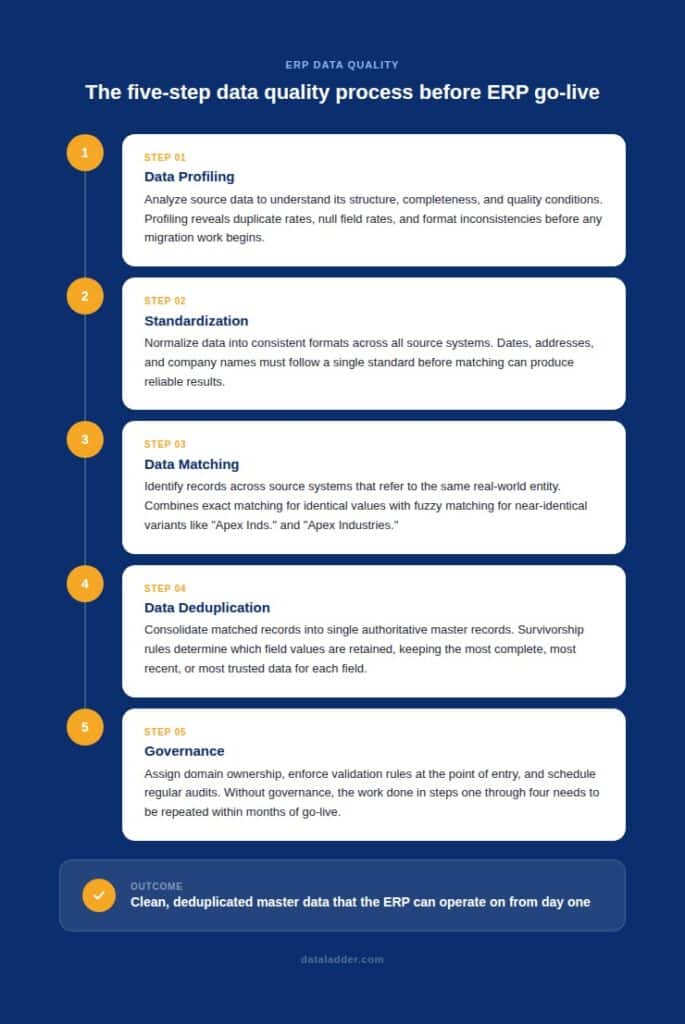
A structured sequence must be followed to improve data quality before ERP implementation. Establishing data quality standards before the work begins is what gives the process direction and prevents the scope from expanding indefinitely. Here’s what should be prioritized before you begin your ERP implementation project:
Data Profiling
Data profiling is the systematic analysis of source data to understand its structure, content, completeness, and quality conditions before any migration work begins. A profiling exercise produces a concrete picture of what you are working with: duplicate rates across entity types, null rates for mandatory fields in the target ERP, format inconsistencies across date and address fields, and the volume of records that appear obsolete based on last-activity dates.
Without profiling, teams need to rely on a lot of guesswork to understand their data and what to do with it. If done correctly, data profiling can help you prioritize the work that will have the most impact on go-live readiness and estimate the effort required to address it.
Standardization
Standardization normalizes data into consistent formats before matching begins. Often, this means that dates are standardized to a single format, addresses are edited to meet postal standards, and company names are normalized to address variation introduced by years of inconsistent entry. The data matching and deduplication steps that follow depend on this consistency.
Data Matching
Data matching feature identifies records across source systems that refer to the same real-world entity. This is where the customer who appears in three systems under slightly different names gets resolved into a single verified identity. Exact matching handles records with identical values on key fields. Fuzzy matching handles the far more common case where values are similar but not identical: “Apex Industries” versus “Apex Inds.” versus “Apex Industries Inc.”, all of which exact matching would classify as separate companies.
Most enterprise data environments require a combination of matching methods. The right combination depends on the data types, the source systems, and how much variation has been introduced over the years of independent entry.
Data Deduplication
Data deduplication consolidates matched records into single, authoritative master records. Once the matching process has identified which records refer to the same entity, survivorship rules determine which field values to retain. What is retained is often records that were most recently updated, are the most complete, or ones that come from the most trusted source system.
The result is a deduplicated master dataset in which each customer, vendor, and product is represented by exactly one record, containing the best available data from all source records. This is the dataset the ERP should receive at migration.
Governance
Data governance is what determines whether clean data stays clean after go-live. It means assigning ownership for each data domain to a named individual in the responsible business function, enforcing validation rules at the point of entry, and scheduling audits against defined quality thresholds.
Without governance, the work done in profiling, standardization, matching, and deduplication needs to be repeated within months. Data preparation best practices offer a broader framework for sustaining these improvements over time.
How Data Ladder Helps Improve ERP Data Quality
Data Ladder’s DataMatch Enterprise (DME) is built to support the data-quality work required by ERP implementations.
Before migration, DME’s data profiling capabilities give teams a quantified picture of quality conditions across source systems, including duplicate rates by entity type, null field rates, and format inconsistencies. This ensures all team members have a clear picture of the data that they are dealing with and helps them set realistic timelines to improve data quality.
For matching and data deduplication, DME applies exact, fuzzy, phonetic, and alphanumeric algorithms to identify records referring to the same entity across systems. DataMatch Enterprise also helps with entity resolution across multiple legacy platforms by consolidating records into authoritative master data before the ERP receives them.
Download a free trial of DataMatch Enterprise and run it against your actual source data to see your real duplicate rates, format inconsistencies, and completeness gaps before they become go-live problems. Or speak with a specialist to discuss how a structured data quality program can be scoped to fit your ERP implementation timeline.
Ready to improve ERP data quality before it spreads downstream?
Try Data Ladder to clean, standardize, and reconcile customer, vendor, and product data across systems.
Start a Free TrialFrequently Asked Questions About ERP Data Quality
What is ERP data quality?
ERP data quality refers to the accuracy, completeness, consistency, timeliness, validity, and uniqueness of data within an enterprise resource planning system. Because an ERP uses data to execute business processes rather than simply store it, quality problems translate directly into errors in transactions, financial reporting, inventory management, and procurement, which is why it is critical to solve them before implementation.
What are the main data quality issues during ERP implementation?
The most common issues are duplicate records across customers, vendors, and products; incomplete master data with missing required fields; inconsistent formats inherited from multiple legacy systems; broken record relationships where transaction documents are linked to incorrect master records; and obsolete data migrated without review or retirement. These issues are present in source systems before migration begins and must be addressed before go-live.
How does poor data quality affect ERP performance?
Poor data quality causes the ERP to produce wrong outputs from correctly configured processes. Errors in master data on vendors, products, customers, etc., propagate through every transaction that references them, turning routine operations like procurement, billing, and payment runs into sources of compounding inaccuracies. The system itself functions correctly. The data being processed does not, and the outputs reflect that.
How do you fix data quality before an ERP go-live?
Teams should approach solving data quality issues sequentially. At the beginning, source data should be profiled to understand actual quality conditions. Then, they should decide how to standardize formats across all source systems to make matching records easier. It’s also important to remove duplicates and implement strict quality controls before any data is migrated. Finally, teams should establish governance to enforce quality standards from go-live forward. While this work often begins months before go-live, it helps prevent years of data quality issues after implementation.
Who owns data quality in an ERP implementation?
A single team or business function shouldn’t be held responsible for data quality. It needs to be a company-wide effort distributed between business functions and IT. Business functions should own the quality of their data domains because they define what correct looks like in their operational context, while IT provides the tools, infrastructure, and technical processes. Without a named owner for each data domain and a defined stewardship model, quality problems accumulate without a clear path to resolution.
How long does data cleansing take before an ERP go-live?
For mid-market organizations, a thorough data quality program typically requires two to four months. For enterprise organizations with multiple legacy platforms, four to eight months is more realistic. The timeline depends on the severity of quality problems found during profiling and the complexity of matching work required across source systems.