



































Last Updated on June 4, 2026
Summary:
Data matching connects records that belong to the same entity across different systems, formats, and datasets. This guide helps data practitioners and business users understand core matching methods, fix common inconsistencies, measure accuracy, and implement a reliable end-to-end workflow. It also outlines the key metrics to track, practical ways to improve accuracy, and real-world examples that show how matching helps teams build a trusted data foundation.
TL;DR
- Most organizations struggle with fragmented, duplicated, or inconsistent data across systems. Matching fixes that.
- Data matching links records that refer to the same real-world entity, even when formats differ or information is incomplete.
- There are three key data matching methods: deterministic (exact), fuzzy (similarity), and probabilistic (weighted scoring).
- A reliable data matching process follows seven steps: profiling, standardization, algorithm selection, scoring, review, consolidation, and continuous improvement.
- Key data matching KPIs include precision, recall, F1 score, duplicate rate, manual review volume, and time-to-golden-record.
- Common data matching challenges include ambiguity, multilingual data, human entry errors, scale, governance, and privacy constraints, all solvable with the right strategy.
- Core data matching use cases include CRM cleanup, Customer 360, SKU matching, vendor unification, patient identity resolution, compliance, marketing activation, and analytics prep.
- A strong solution should offer configurable rules, hybrid matching methods, transparent scoring, standardization tools, and enterprise-scale performance.
- Real-world results (from Data Ladder customers) include fewer duplicates, cleaner customer identities, better personalization, faster processing, and major operational savings.

What is data matching?
Data matching is the process of identifying and linking records that refer to the same real-world entity, even when those records come from different systems, follow different formats, or contain inconsistent information. These entities may be customers, patients, students, products, suppliers, employees, companies, locations, or any other object that matters to an organization.
For example, data matching helps businesses recognize that:
- Sarah J. O’Neill in one database and S J Oneill in another likely represent the same person.
- GlobalTech Solutions and Global Tech Sol. Inc. are the same company.
- 500 Elm St. and 500 Elm Street, Suite 12 point to the same location.
The goal of data matching is not just to “dedupe” rows. Its purpose is to reveal accurate relationships between entities across systems to help create a unified view of data that teams can trust and base their decisions on.
Why Data Matching Matters (Benefits & Business Value)
Most organizations think they know their data, until they try answering a seemingly simple question, like:
“How many customers do we actually have?”
The answer is rarely straightforward because, in reality, data is hardly ever clean, consistent, or complete.
Research shows that organizations now use an estimated average of 991 applications across their digital estate, and 79% of employees work in siloed systems.
This makes it extremely difficult (if not impossible) to obtain a complete, reliable view of information.
These are exactly the kind of problems data matching solves. And why it’s essential.
Some of the key benefits of data matching include:
- Operational Accuracy: Processes run on correct, consistent information.
- Customer 360: Enables personalized experiences, informed engagement, and seamless service across touchpoints.
- Compliance & Regulatory Readiness: Helps meet KYC, AML, HIPAA, GDPR, and other regulatory obligations by ensuring records are accurately maintained and consolidated. Organizations can’t comply if systems disagree on basic entity attributes.
- Analytics and AI Reliability: Properly matched data ensures dashboards, reports and machine learning models deliver reliable insights. Mismatched records can skew predictions, inflate counts, and compromise AI-driven decisions.
- Cost Reduction: Prevents waste from duplicate campaigns, shipping errors, and redundant processes.
- Fraud Prevention and Risk Management: Identifies duplicate or suspicious records to mitigate identity fraud and financial risk.
- Foundation for Data Quality and MDM Initiatives: Every downstream data quality initiative relies on accurate matching. Poor matching or messy records weaken the entire data ecosystem.
Common Signs of Poor Data Matching

Duplicate accounts or records across systems.

Conflicting information in reports or dashboards

Inflated or inaccurate marketing and mailing lists

Failed audits or compliance issues
Types of Data Matching Methods
There’s no single “right” way to match data. Different situations require different approaches, and most enterprise-grade data matching software, including DataMatch Enterprise (DME) by Data Ladder, use an approach that blends multiple data matching techniques for accuracy and scalability.
The most commonly used data matching methods include:
1. Deterministic Matching (Exact, Rule-Based Matching)
Deterministic matching uses explicit rules to determine whether two records should be considered the same. It relies on fields that are expected to be unique or consistent across systems, such as email addresses, national ID numbers, phone numbers, or customer account IDs.
This is the most straightforward approach to data matching:
If Rule X is true, then the records match.
If not, they don’t.
Strengths:
- Highly accurate when unique identifiers are present
- Easy to explain and audit (compliance-friendly)
- Fast and efficient at scale
Limitations:
- Breaks down when IDs are missing, outdated, inconsistent, or formatted differently
- Cannot resolve nicknames, misspellings, or structural differences
- Often produces false negatives in messy datasets
Most organizations start with deterministic or exact data matching, then expand their strategies to include other matching methods as data complexity increases.
2. Fuzzy Matching (Similarity-Based Matching)
Fuzzy matching compares values not as perfect matches, but as degrees of similarity. For example, instead of requiring matching “Johnathan” to “Jonathan” character-for-character, fuzzy matching measures how close the two values are.
It is used when the data isn’t identical but is close enough to suggest a possible match.
Common fuzzy matching algorithms include:
- Levenshtein Distance – measures character edits
- Jaro-Winkler – prioritizes prefix similarity
- N-Gram – compares overlapping chunks of characters
Fuzzy matching is especially valuable when dealing with human-entered data, where typos, spacing differences, reordered words, abbreviations, and nicknames are more common.
For a complete breakdown of fuzzy matching techniques, benefits, workflow, and more see our Fuzzy Matching 101 guide.
Strengths
- Captures real-world variations and spelling differences
- Reduces false negatives caused by small data inconsistencies
- Useful when unique identifiers are missing or unreliable
Limitations
- Can introduce false positives without proper thresholds
- Requires tuning (thresholds, weights, field importance)
- Works best when combined with rules or scoring
3. Probabilistic Matching (Weighted, Score-Based Entity Resolution)
Probabilistic approaches take data matching a step further. Instead of looking at fields independently or scoring only similarity, it evaluates the probability that two records belong to the same entity based on a weighted combination of fields.
This method is specifically useful for large datasets with incomplete or inconsistent fields, records without unique identifiers, and situations where no single field is reliable enough on its own.
Strengths
- More context-aware than pure fuzzy matching
- Produces confidence scores for easy review
- Reduces both false positives and false negatives
Limitations
- Requires knowledge of which fields matter most
- More computationally complex than deterministic rules
- Needs careful threshold tuning
4. ML/AI-Based Matching (Modern Entity Resolution)
ML-based matching uses machine learning models trained on examples of “match” and “no match” to identify patterns too subtle or too complex for manually written or traditional rules. These models often use embeddings (mathematical representations of meaning) to compare names, companies, and text values across languages or formats.
They are particularly valuable for large-scale, noisy datasets where traditional methods struggle.
Strengths
- Learns patterns and improves over time
- Can handle multilingual and complex variations
- Useful for large-scale, high-noise environments
Limitations
- Requires labeled training data
- Harder to govern and audit
- More computationally intensive
Most organizations still rely primarily on deterministic, fuzzy, and probabilistic methods, introducing ML only when scale and complexity demand it.
Seeing these data matching issues in your own systems?
Use Data Ladder to profile, match, and deduplicate records across sources before bad data affects reporting, compliance, or customer experience.
Start a Free TrialData Matching Methods – A Quick Comparison
Method
Method
Strenghts
Limitations
Deterministic
Unique IDs, exact fields.
Fast, precise, audit-friendly.
Fails with missing or inconsistent data.
Fuzzy Matching
Names, addresses, descriptions
Captures variations
Requires threshold tuning, risk of false positives
Probabilistic
Multi-field comparison
Balanced accuracy, context-aware
Needs weight/scoring configuration
ML/AI Matching
Large-scale, multilingual, complex text
Learns patterns, handles nuance
Requires training data; harder to audit
Data Matching vs. Deduplication vs. Data Cleansing: What’s the Difference?
These three concepts are closely related, but they serve different purposes in a data quality workflow.
Data cleansing focuses on fixing the data itself. This includes correcting typos, standardizing formats, parsing names, normalizing addresses, validating fields, and resolving structural inconsistencies. Cleansing improves data quality but does not determine whether two records represent the same entity.
Deduplication does exactly what the name says, but only within a single dataset. The goal is to find and merge duplicate entries, for example, multiple customer profiles inside a CRM. Deduplication is usually the final step in a cleanup process and depends heavily on the accuracy of the matching logic underneath it.
Data matching is broader and more strategic. It identifies records that belong to the same real-world entity across systems, datasets, formats, and sources. Matching reveals relationships between fragmented records, powers entity resolution, and enables downstream processes like Customer 360, MDM, analytics accuracy, compliance checks, and yes – deduplication.
Simply put, cleansing prepares the data, matching connects it, and deduplication consolidates it.
Function
What It Does
Works Across Multiple Systems?
Primary Outcome
Data Cleansing
Fixes data quality issues (typos, formatting, parsing, normalization).
No
Cleaner, standardized data.
Data Matching
Identifies records that refer to the same real-world entity, even across sources.
Yes
Linked, unified records with accurate relationships.
Data Cleansing
Fixes data quality issues (typos, formatting, parsing, normalization).
No
Cleaner, standardized data.
Common Data Inconsistencies That Data Matching Resolves
Most matching issues come from normal, everyday inconsistencies created as people, systems, and processes evolve.
For example:
- A CRM uses one naming convention; an ERP uses another.
- A customer signs up with a nickname on one form and their legal name on another.
- A vendor updates their business name but an older system still stores the previous version.
None of this is unusual. But when these inconsistencies multiply across thousands of records, matching becomes difficult without the right methods in place.
Below are the most common types of inconsistencies data matching is designed to resolve; the ones you’re likely dealing with across product, patient, supplier, citizen, or customer data.
Inconsistency Type
Example
How Matching Resolves It
Typos & Misspellings
Jonh → John
Fuzzy similarity
Formatting differences
123 Main St vs 123 MAIN STREET
Standardization
Synonyms/Nicknames
Liz → Elizabeth
Dictionaries, semantic matching
Reordered fields
Smith, John vs John Smith
Parsing + tokenization
Partial / Missing data
Missing email/ZIP
Weighted scoring
Entity Variations
GE → General Electric
Hybrid deterministic + fuzzy
Cross-System Differences
Full Name vs First/Last
Component matching
Language Variations
München → Munich
Transliteration + ML features
The more diverse your systems, the more these differences multiply.
A mature data matching platform recognizes patterns across all these consistencies and links records reliably, even when fields don’t align perfectly.
Data Ladder helps standardize data, identify likely matches, and reduce duplicates in a single workflow built for enterprise data quality.Ready to bring cleansing, matching, and deduplication together?
How Data Matching Works (Step-by-Step Process Breakdown)
Data matching isn’t a single “run this algorithm and you’re done” task. It’s a structured workflow that prepares data, applies the right comparison logic, evaluates confidence in results, and continuously improves data accuracy. While technical implementations vary across organizations, the underlying matching process is remarkably consistent.
Below is a clean, practical, business-friendly walkthrough of how data matching works from start to finish; the same workflow used by most enterprise-grade platforms, including DataMatch Enterprise.
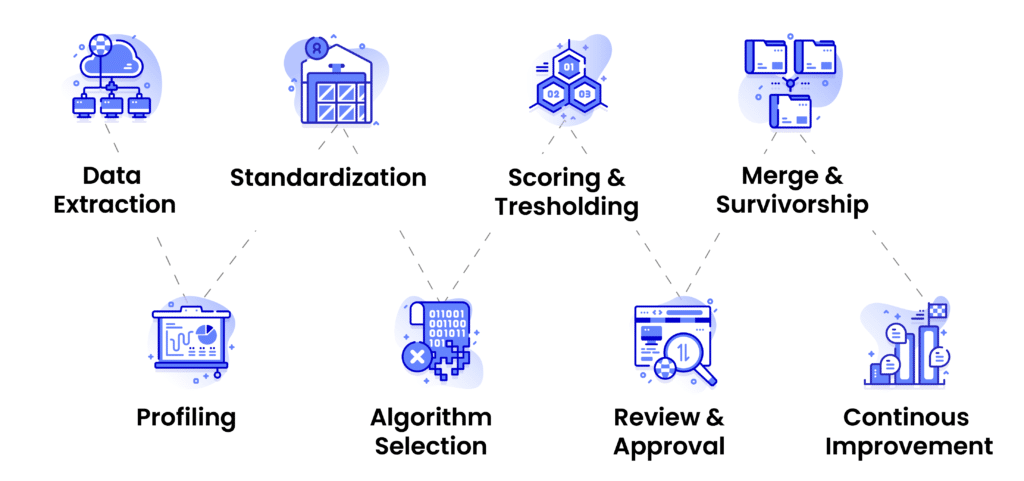
Step 1: Data Extraction and Profiling
Matching starts with understanding the data you’re working with. That means pulling records from source systems and running a quick assessment to identify patterns, inconsistencies, completeness, and potential issues.
Typical questions answered at this stage:
- How many records do we have across systems?
- What fields are available for matching?
- Are key identifiers (name, email, address, phone) complete?
- What formats or patterns appear across systems?
- Are there obvious anomalies, outliers, or corrupt entries?
Profiling sets expectations early.
For example,
If phone numbers are formatted inconsistently, you catch it before matching starts.
If one system uses First/Last Name and another uses a single Full Name field, you plan ahead.
This reduces errors downstream and helps set up the right matching strategy.
Step 2: Standardization and Normalization
Before comparing anything, the data must be prepared. Two records won’t match if one says “5th Avenue” and another says “5TH AVE” or “Fifth Avenue,” even though they refer to the same location.
Standardization converts data into consistent formats. And normalization restructures, cleans, and simplifies fields for fair comparison.
Typical data preparation steps at this stage include:
- Unifying date formats
- Normalizing casing (e.g., converting everything to uppercase/lowercase)
- Removing special characters and punctuation
- Expanding or standardizing abbreviations (St → Street)
- Formatting phone numbers consistently
- Splitting or combining fields (e.g., parsing full name into components)
Matching quality rises dramatically when your datasets speak the same structural language.
Step 3: Algorithm Selection and Configuration
This is the core of the process. Once data is prepared, the matching engine determines how to compare fields.
Depending on dataset quality and business context, teams may use:
- Deterministic rules where IDs are reliable.
- Fuzzy similarity for names, addresses, and descriptions.
- Probabilistic scoring when no field is consistently reliable.
- ML/embedding-based similarity for complex text or multilingual data.
- Hybrid algorithms for maximum accuracy.
Example:
Two customer records may be compared using:
- Deterministic: Email match → strong indication.
- Fuzzy: Name similarity score → moderate.
- Probabilistic: Phone + Address + ZIP combined → high probability.
- ML/Embedding: Semantic similarity of company or job titles → supporting evidence.
Step 4: Match Scoring and Threshold Tuning
Every record comparison generates a score, whether from fuzzy logic, probabilistic weights, score, or a blended model.
But score alone doesn’t determine action.
Thresholds do.
A properly configured system uses three threshold zones:
- Match Zone (High Confidence)
Records with scores above a defined threshold are automatically considered the same entity.
Example: 95% score → match.
- Possible Match Zone (Review Required)
Scores in a middle band need human review or a secondary automated check.
Example: 80–94% score → send to review queue.
- Non-Match Zone (Low Confidence)
Scores below the minimum threshold are treated as different entities.
Example: Below 80% → no match.
- How to Set Matching Thresholds?
Matching thresholds vary depending on the dataset, industry, and a business’ risk tolerance.
For example:
Healthcare or government datasets likely require conservative thresholds. But retail product data may allow slightly flexible ranges.
The goal, however, is always the same: maximize true matches while minimizing false positives and false negatives.
Step 5: Review and Approval Workflow
Even the most well-tuned systems produce ambiguous cases; records that could match but lack enough confidence. These go into a review workflow, where a data steward or admin verifies the decision.
Reviewers typically see:
- Side-by-side field comparison
- Per-field similarity scores
- The overall match score.
- Notes or explanations from the system.
- Suggested action (merge, link, reject).
This ensures data quality remains high and prevents incorrect merges.
What happens after approval?
- Confirmed matches get merged or linked (based on the business rules).
- Confirmed non-matches remain separate.
- These decisions feed back into the system to improve future accuracy.
This human-in-the-loop step is especially important for complex, regulated, or high-stakes data environments.
Step 6: Consolidation and Publishing
Once matches are finalized, the system generates unified outputs.
Depending on organizational needs, this could mean:
- Creating a golden record (one canonical version)
- Assigning a shared entity ID
- Merging records inside a master data repository or CRM
- Publishing the cleansed, unified data to downstream systems
- Exporting deduplicated lists for analytics or reporting
This is the step where matching delivers real business impact, i.e., single customer view, consolidated product catalogs, unified patient lists, trustworthy citizen registries, accurate vendor databases, and more.
Step 7: Ongoing Monitoring and Improvement
Data matching is not a one-time project. New data, new systems, and new inconsistencies constantly enter the environment. Monitoring ensures accuracy stays high over time.
This typically includes:
- Periodic quality checks
Threshold recalibration. - Updating reference lists, dictionaries and synonyms.
- Generating exception reports.
- Auditing match decisions.
- (Where applicable) retraining semantic or ML models.
Organizations that treat matching as an ongoing discipline, not a one-off task, see far better long-term results.
Data Matching Process – Quick Visual Overview
Data Matching KIPs & Success Metrics
Measuring the success of your data matching setup is essential to ensure your organization’s data is accurate, reliable, and ready for operational or analytical use. Without clear metrics, it’s impossible to know whether your matching processes are effective, or if improvements are needed.
Key performance indicators (KPIs) provide visibility into both the technical accuracy of your matching process and the business impact. Below are the most important data matching metrics to track:
KPI
How to Measure
Why It Matters
Precision
Percentage of matched records that are correct.
Ensures your system isn’t generating false matches, maintaining trust in data relationships.
Recall
Percentage of true matches that were successfully identified.
Captures how complete your matching process is, reducing missed duplicates or entities.
F1 Score
Harmonic mean of precision and recall.
Provides a balanced view of matching quality when both false positives and false negatives matter.
Duplicate Rate
Number of duplicate records identified ÷ total records.
Helps monitor how effectively your system removes redundant or conflicting data over time.
Time to Golden Record
Average time taken to create a final unified record.
Tracks operational efficiency and the speed of data availability for business users.
Manual Review Volume
Number of matches requiring human validation.
Indicates how much intervention is needed, helping optimize thresholds and automate more confidently.
Business KPIs
Metrics like cost savings, compliance accuracy, fraud prevention.
Links technical performance to tangible business outcomes and ROI.
Tracking these KPIs regularly helps organizations fine-tune matching rules, thresholds, and algorithms, and demonstrates the measurable value of clean data.
How to Measure Data Matching Accuracy in Practice?
A practical evaluation mechanism usually follows this cycle:
1. Build a labeled test set: A small subset of your data where true matches are manually verified.
2. Apply your current matching rules: Using established thresholds, algorithms, and weights.
3. Compare predicted matches against the truth: This gives you TP, FP, and FN counts.
4. Calculate precision, recall, and F1 score: These three numbers tell you how your system is performing (quantify performance).
5. Tune thresholds and re-test: Adjust in small changes; even 0.05 changes in thresholds can significantly improve outcome balance.
6. Repeat until scores stabilize.
Common Data Matching Challenges & How to Overcome Them
Even with the right methods, organizations run into practical barriers that affect match accuracy. Understanding these issues helps teams anticipate potential pitfalls, avoid mistakes that lead to false matches or missed matches, and build a more reliable matching environment.
Some of the most common challenges in data matching include:
1. Data Ambiguity and Missing Context
The single biggest challenge in data matching is ambiguity. When records don’t contain enough identifying information, even the best matching engines cannot reach confident decisions.
Common sources of ambiguity:
- Partial or shortened names.
- Blank or inconsistent fields.
- Shared phone numbers or addresses.
- Variations in email formatting.
- Generic company names.
Why it’s difficult:
Ambiguous data increases the risk of both false positives and false negatives because the matching system has too little evidence to make a confident decision.
How to address ambiguity:
- Use multiple complementary fields.
- Assign weights based on field reliability.
- Exclude weak identifiers from high-impact rules.
- Route borderline cases to human review.
2. Cross-Language and Character-Set Issues
Matching across languages comes with challenges such as transliteration, accented characters, and non-Latin scripts.
Examples:
José vs. Jose
محمد vs. Mohammed
北京 vs. Beijing
Simple normalization doesn’t always capture these differences.
Mitigation strategies:
- Unicode normalization.
- Phonetic algorithms adapted for multiple languages.
- Embedding-based semantic similarity (when applicable).
- Custom dictionaries for domain-specific terms.
Multilingual datasets often require more careful configuration than domestic, English-dominated environments.
3. Human Data Entry and Behavioral Variability
Data is still entered manually in many industries. And this creates the risk for data inconsistencies such as:
- Swapped fields (first name vs. last name).
- Typos and spacing differences.
- Inconsistent abbreviations
- Varying order of name components.
- Optional fields used inconsistently.
Why this matters:
These irregularities add noise that scoring algorithms must work through. In other words, it increases the need for thorough preprocessing and domain-specific rules.
4. Scalability Challenges with Large Datasets
Matching data as scale (millions of records or more) is computationally intensive and expensive. Hence, a naïve “compare everything to everything” approach becomes impossible at scale.
Scalability bottlenecks include:
- Pairwise comparison explosion.
- Slow or inefficient. blocking/indexing strategies.
- Memory constraints.
- Latency in merging matching decisions across distributed systems.
How modern systems solve this problem:
- Smart blocking/indexing (e.g., Sorted Neighborhood, LSH).
- Distributed matching pipelines.
- Vector search indexing for semantic similarity.
- Streaming-based entity resolution.
This is one of the biggest differentiators between homegrown scripts and enterprise-grade data matching solutions.
5. Regulatory and Privacy Constraints (GDPR, HIPAA, PCI)
Matching often requires combining personal or sensitive data; something heavily regulated in industries like healthcare, finance, and government.
Key constraints include:
- Limits on using personal identifiers.
- Data anonymization requirements.
- Audit trail expectations.
- Consent, retention, and data minimization rules.
- Cross-border data transfer restrictions.
Mitigation:
- Encrypt or pseudonymize sensitive identifiers.
- Minimize reliance on high-risk fields.
- Maintain detailed audit logs.
- Configure role-based access to match results.
6. False Positives and False Negatives
No matching system is perfect. Even the best ones can occasionally misclassify similar records (false positives) or miss actual duplicates (false negatives) when thresholds, rules, or data quality fall out of alignment
Typical causes:
- Thresholds not aligned with business risk.
- Overly strict or overly loose rules.
- Low-quality or outdated data in certain fields.
- Incomplete normalization.
- Mismatch between algorithm choice and field type.
Mitigation:
- Continuous threshold tuning.
- Field-level weighting.
- Reviewer queues for uncertain cases.
- Periodic retraining or rule refinement.
- Domain-specific logic (e.g., DOB must match).
Accuracy improves significantly when matching configurations evolve with the data.
7. Operational Complexity in Multi-System Environments
Organizations often run dozens of systems, each with its own schema, update cadence, and interpretation of “master records.”
Common challenges include:
- Conflicting field definitions
Inconsistent or missing keys. - Multiple “master” versions of the same record.
- Different or disconnected update cycles.
- High coordination overhead across teams.
Matching is only part of the effort; unifying data across systems requires broader architectural alignment.
Best practices:
- Create a clear source-of-truth model.
- Standardize schemas where possible.
- Build a governance process around matching decisions.
- Plan for ongoing maintenance, not a one-time cleanup.
Data Matching Challenges - Summary
Challenge
Impact
How Data Matching Helps
Missing or Incomplete Fields
Records fail exact match rules.
Fuzzy & probabilistic methods can identify likely matches despite gaps through partial similarities.
Inconsistent Formatting
“Different” values that mean the same thing.
Standardization and normalization of data before matching + fuzzy/token algorithms bridge the gap.
Nicknames & Abbreviations
“Mike” vs “Michael,” or “Intl.” vs “International” can lead to false non-matches or duplicate records.
Fuzzy logic, ML models, and synonym dictionaries capture variations and common aliases.
Large Scale Comparisons
Comparing millions of records can be slow and resource-intensive.
Blocking, indexing, and optimized algorithms reduce comparison volume and computational overhead.
Ambiguous Data
False duplicates or false negatives.
Weighted scoring across multiple fields improve match decisions.
Lack of Governance
Unclear ownership or inconsistent rules lead to mismatches and errors.
Defined stewardship, thresholds, and monitoring ensure consistency and accountability.
Where Is Matching Used – Common Data Matching Use Cases
In the practical world, organizations don’t match data for the sake of hygiene. They do it because every core business process depends on data. And unless it’s accurate, complete, and reliable, all those processes are at risk.
Some of the most common practical applications of data matching include:
- CRM Cleanup.
- Customer 360.
- Product & SKU matching.
- Vendor & supplier matching.
- Patient record consolidation.
- Healthcare entity matching.
- Identity resolution for compliance.
- Market & audience activation (dedupe contacts to improve segmentation and targeting).
- Fraud detection & risk management.
- Analytics & AI readiness.
- Government & public sector (unify citizen, tax, and registry data across agencies).
How Matching Solves Data Quality Issues: Real-World Case Studies
Here are a few compelling real-world examples from Data Ladder’s customers that illustrate how data matching delivers business value, with before/after metrics, pain point, approach, and results.

Case Study A
Pain Point:
A large retail group operating across Belgium and the Netherlands relied on separate systems for stores, online sales, and loyalty programs. Customer records overlapped across five sources, often with different spellings, formats, and incomplete attributes. The lack of a single customer view undermined personalization, loyalty programs, and marketing efforts.
Approach:
A small three-person team used automated matching to link and consolidate records across brands, formats, and countries. They combined deterministic rules (IDs, emails) with fuzzy and probabilistic matching to reconcile variations and duplicates.
Results:
- A consolidated customer view in just 2 months.
- Eliminated months of manual work and saved human resources (the process would have taken a 10-person IT team and 6 months manually).
- Equipped systems across organization with clean, consistent identities.
Impact:
The company used unified, accurate customer records in their CRM and PIM to drive personalized marketing and better customer engagement.
Case Study B
Pain Point:
A hotel chain’s loyalty program was plagued by duplicate and incomplete customer entries, making it difficult to track guest behavior, segment customer, or run accurate email campaigns.

Approach:
The team ran several rounds of fuzzy and rule-based matching across their customer database to identify duplicates, unify guest profiles, enrich incomplete entries, and, eventually, to generate a “golden record” for each guest.
Results:
- Significant reduction in duplicate guest profiles.
- Faster data processing with less manual review.
- More reliable segmentation and email targeting.
Impact:
The cleaner identity layer improved the loyalty program’s performance and elevated guest communication across channels.
The Sum Up
Clean, connected, and trustworthy data is the foundation.
Data matching is powerful, but it isn’t magic. Its effectiveness depends on the quality.
Accurate matching is the backbone of a strong data foundation. Build it well, and it supports everything that follows. Organizations that invest in data matching seem both immediate and long-term benefits, including but not limited to sharper analytics, more reliable reporting, cleaner CRM and ERP systems, better personalization, fewer operational errors, and significantly lower compliance risk.
For teams looking to operationalize this work, DataMatch Enterprise offers the transparency, configurability, and speed needed to unify records at scale without unnecessary complexity.
Download a free DataMatch Enterprise trial or get in touch with us for a personalized demo to learn how data matching can help you improve your business operations.
Ready to improve data matching in your environment?
Try Data Ladder on your own data to see how it supports matching, deduplication, and entity resolution across complex systems.
Start a Free TrialFrequently Asked Questions (FAQs)
1. Why do organizations need data matching?
Disparate systems often hold fragmented or duplicated versions of the same record. Without matching, this leads to inaccurate reporting, duplicate communications, poor customer experiences, wasted marketing spend, and compliance risks.
Data matching unifies these fragmented records so organizations can work from a reliable, consistent dataset.
2. What are the main types of data matching methods?
There are four major approaches:
- Deterministic matching: rule-based, using exact matches.
- Fuzzy matching: similarity-based, tolerating variations and typos.
- Probabilistic matching: assigning scores based on how likely two records refer to the same entity.
- AI/ML-based matching: used in some advanced or specialized environments.
Most enterprise platforms use a hybrid of deterministic and fuzzy logic for transparency and accuracy.
3. How is data matching different from data cleansing and deduplication?
Data cleansing improves the quality of the data itself by fixing errors, standardizing formats, and correcting inconsistencies.
Data matching identifies relationships between records. Deduplication merges those matches into a single “best” or “golden” record. Matching sits in the middle; it powers accurate deduplication and MDM workflows.
4. How accurate is data matching?
Accuracy depends on four factors: data quality, preprocessing, the matching logic used, and how thresholds are tuned.
High-quality inputs and strong standardization can raise accuracy significantly.
Enterprise tools also provide reviewer queues for ambiguous cases, ensuring that edge decisions are validated before merging.
5. What algorithms are used for fuzzy data matching?
Fuzzy matching relies on string similarity algorithms such as Levenshtein Distance, Jaro-Winkler, character-based n-grams, token-based matching, and phonetic techniques.
These algorithms allow the system to catch variations like spelling differences, reordered words, extra/missing characters, and partial similarities.
6. What should I look for in a data matching tool?
The most important capabilities include:
- Hybrid deterministic + fuzzy matching
- Configurable rules and thresholds
- Strong data standardization
- Scalable performance
- Transparent match reasoning
- Integration with your existing system

To learn more about evaluating a data matching solution, check out our blog:
Top Questions to Ask When Evaluating a Data Matching Solution.
7. How does Data Ladder ensure secure and compliant data matching?
DataMatch Enterprise supports secure data processing by allowing teams to run the platform in controlled environments, including fully on-premise deployments where data never leaves the organization’s infrastructure. The platform also provides transparent matching with configurable logic, giving teams full visibility into how match decisions are made. This transparency helps organizations meet internal governance and regulatory expectations without relying on black0box algorithms.
8. Does data matching require coding?
Not with DataMatch Enterprise.
DME provides a no-code interface for rule creation, fuzzy logic configuration, and threshold tuning. This allows business and data teams to manage matching processes without relying on engineering for every change.
9. How often should organizations run data matching?
Most businesses run matching on a recurring schedule to prevent duplicate data from accumulating again.
The frequency depends on how quickly new data flows into your systems. Some teams match daily or weekly, while others run monthly cycles or automate matching as part of master data management.