




































Last Updated on May 25, 2026
ZIP+4 lookup is the process of appending the correct four-digit add-on to a five-digit ZIP code to identify a delivery segment (a block, building, or large recipient). For businesses, the real challenge isn’t the definition — it’s appending accurate ZIP+4 codes across thousands of records, validating them against the live USPS database, and keeping them current as ~5% change monthly.
This guide covers how to look up, append, batch-validate, and clean ZIP+4 codes at scale, and how address verification software can get your mailing data down to delivery-point precision.
What Is a ZIP Code?
The five-digit ZIP Code launched on July 1, 1963, when the Post Office Department created the Zone Improvement Plan to handle growing mail volume across a more spread-out country.
Each digit does something specific. The first narrows to a group of states. The second and third point to a region or major city. The fourth and fifth get you to a local delivery zone: a neighborhood, a district, a section of a city.
Useful enough for everyday mail. Not useful enough for bulk campaigns. A single five-digit ZIP can cover thousands of addresses tens of thousands in a dense urban area. For bulk mailers, that lack of resolution creates real problems.
What is ZIP Plus 4?
The USPS tackled this in 1983, twenty years after ZIP codes launched. The four extra digits narrow delivery down to a carrier route segment typically a city block, a cluster of apartments, or a single high-volume recipient. Each ZIP+4 code covers somewhere between 6 and 20 delivery points.
What most people miss: ZIP+4 codes aren’t static. About 5% change every month as the USPS reorganizes routes, renumbers addresses, and updates its database. A list you verified a year ago may already have a meaningful number of stale codes sitting in it.
How to Look Up and Append ZIP+4 Codes
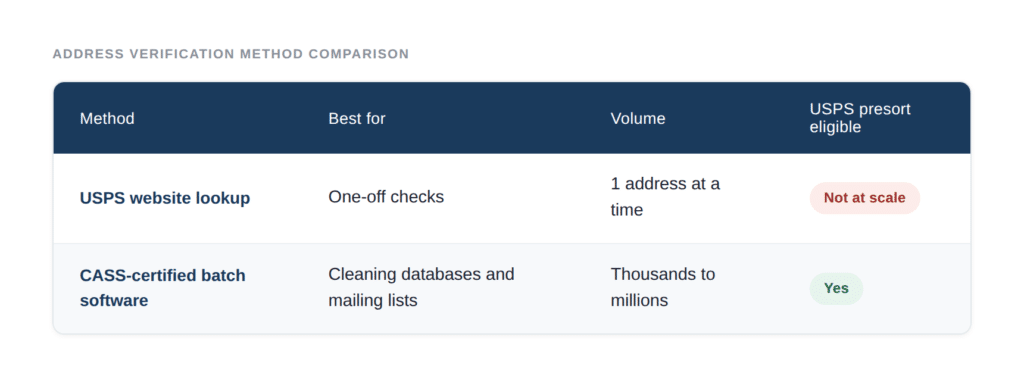
There are two main ways to look up ZIP+4 codes: the USPS ZIP Code Lookup tool for single addresses and CASS-certified batch software for large address lists. For one address, the USPS website works. For a database of thousands, only batch validation against the live USPS database is practical.
Option 1: Single-address ZIP+4 lookup (USPS website)
The USPS provides a free ZIP Code Lookup tool that returns the full ZIP+4 for any valid U.S. address. This works for occasional, one-off lookups. It does not work for bulk processing — there is no upload, and it’s rate-limited for manual use.
Option 2: Batch ZIP+4 validation (for databases and mailing lists)
For an existing address database, CRM, or mailing list, batch validation is the only practical option. CASS-certified software processes the entire file against the live USPS database, appends the correct ZIP+4 (and ZIP+6) to each record, flags undeliverable addresses, and outputs a clean, presort-eligible file.
Why batch lookup is different from a simple lookup
A single-address lookup assumes the address is already clean. Real databases aren’t. Before a ZIP+4 can be appended accurately, the underlying address often needs standardization (abbreviations, unit designators, misspellings) and deduplication. A batch ZIP+4 process that skips cleaning produces ZIP+4 codes appended to the wrong addresses which means there will be accurate codes on bad records.
What Are the Benefits of ZIP Plus 4?
For most mailers, a 5-digit ZIP gets the job done. However, if you’re running high-volume campaigns, working with demographic data, or trying to cut postage costs, the extra four digits carry more weight than most people expect.
- Lower bulk mail costs: USPS presort discounts apply only when ZIP+4 codes have been verified within the last 12 months. Codes older than that don’t just fail to qualify. They can actively slow down delivery.
- Sharper demographic segmentation: A standard 5-digit ZIP covers thousands of households. ZIP+4 narrows that to a handful, letting you target a specific block rather than an entire neighborhood. For products tied to a particular income bracket or household profile, that precision translates directly into better campaign ROI.
- Better household targeting: When two households share the same street address (a duplex, a multi-family property), ZIP+4 alone can’t distinguish between them. That’s where ZIP+6 comes in, separating individual delivery points within the same address.
Why ZIP+4 Matters for Mailers
The biggest immediate benefit is postage. USPS presort discounts apply to qualifying bulk mailings with valid, recently verified ZIP+4 codes, and the savings add up at scale. Delivery speed also improves: ZIP+4 can shave up to two days off delivery time compared to five-digit addressing.
For marketing teams, the segmentation benefit is just as valuable. In some rural areas, a high-income enclave with dual-income households sits right next to a lower-income area with very different spending patterns and the same five-digit ZIP covers both. ZIP+4 separates them.
What Is ZIP+6?
ZIP+6 is the most granular level of postal addressing the USPS supports. It takes the nine digits of ZIP+4 and adds two more a delivery point suffix to identify a single specific mailbox, apartment unit, PO box, or mail slot.
Where ZIP+4 gets you to a block or a building, ZIP+6 gets you to the door.
Technically, ZIP+6 is shorthand for the 11-digit code used in USPS Delivery Point Validation (DPV): the nine-digit ZIP+4 plus the two-digit delivery point code. Every deliverable address in the USPS database has one, and no two share the same code.
A Practical Example
Picture a street with 40 houses. Numbers 8 through 16 are duplexes each property contains two separate households living at the same street address. Take number 12: one side is owned by a high-earning couple, the other is rented by a young family on a tight budget.
Both households share the same ZIP+4. A mailing list segmented by ZIP+4 would treat them as identical same targeting, same messaging, same offer. That’s a problem if your product is only right for one of them.
ZIP+6 gives each household its own code. You can separate them into different segments and send each one something relevant. That level of precision isn’t possible at ZIP+4.
ZIP vs ZIP+4 vs ZIP+6: Comparison Table
| Feature | ZIP (5-digit) | ZIP+4 (9-digit) | ZIP+6 (11-digit) |
| Precision level | Neighbourhood / postal zone | City block / carrier route (6–20 addresses) | Individual delivery point |
| Addresses covered | Thousands | 6–20 | 1 |
| USPS presort discount eligible | No | Yes (when verified) | Yes |
| Supports demographic segmentation | Basic | Neighbourhood-level | Household-level |
| Frequency of change | Rare | Up to monthly | Up to monthly |
| Multi-unit building resolution | No | No | Yes |
| Required for DPV (Delivery Point Validation) | No | No | Yes |
Why Address Data Quality Makes ZIP+6 Possible Or Impossible
Getting to ZIP+6 accuracy isn’t only a matter of using the right address verification software. It also depends entirely on the state of the underlying address data you’re working with. In most enterprise databases, addresses have accumulated from multiple sources over time: CRM imports, web form submissions, purchased lists, legacy system migrations. The result is usually a database where the same person appears multiple times with slightly different formatting, spelling variations, or outdated ZIPs.
Before verification can reach ZIP+6 precision, those duplicates have to go. This is where data matching software and address quality tools work together.
Need cleaner address data before verification?
Use Data Ladder to standardize, match, and deduplicate address records before bad data affects ZIP+6 accuracy.
Start a Free TrialPractical Use Cases of ZIP+4 for Data Quality
Why ZIP+4 Matters for Mailing List Accuracy
ZIP+4 directly affects mailing list accuracy in three ways: it qualifies the list for USPS presort discounts (only when verified within 12 months), it reduces undeliverable mail by resolving to a specific delivery segment, and it enables block-level deduplication. A mailing list without current ZIP+4 codes costs more to mail and delivers less reliably.
A mailing list is only as accurate as its most recent verification. Because roughly 5% of ZIP+4 codes change every month, a list verified a year ago can have 50%+ drift in the worst cases. For high-volume mailers, this shows up as lost presort discounts and rising undeliverable rates. The fix is scheduled re-validation, not one-time cleanup.
How to Standardize and Clean ZIP+4 in Your CRM
Cleaning ZIP+4 in a CRM requires four steps: export or connect the address records, standardize the underlying address (abbreviations, unit designators, formatting), deduplicate so you validate one record per delivery point, then batch-append validated ZIP+4 codes back to the CRM. Validating before standardizing produces accurate codes on inconsistent records.
Most CRMs (Salesforce, HubSpot, Dynamics) store addresses as free text with no validation at entry. Over time this creates the same delivery point recorded multiple ways. The correct sequence:
- Extract address records from the CRM
- Standardize address components to USPS format
- Deduplicate records that resolve to the same delivery point
- Batch-validate and append ZIP+4 / ZIP+6 against the live USPS database
- Sync the clean, validated addresses back to the CRM
- Schedule re-validation (quarterly recommended, given monthly ZIP+4 drift)
ZIP+4 Validation with CASS Certification
CASS (Coding Accuracy Support System) certification confirms that software accurately appends and validates ZIP+4 and ZIP+6 codes against the official USPS database. Only CASS-certified processing qualifies a mailing for USPS automation discounts. Non-certified ZIP+4 appending has no accuracy guarantee and does not qualify for postal discounts.
DataMatch Enterprise holds both CASS™ and PAVE™ Gold certification, with direct access to the USPS database for ZIP+4 and ZIP+6 appending, and LACSLink® integration for converting rural-route addresses to city-style formats. CASS certification recertifies annually, so the certification is only meaningful if current.
For more detail, see our CASS address validation guide.
Who Actually Needs ZIP+6?
Not every organization does. It matters if:
- You’re sending large volumes of direct mail and want to qualify for maximum presort discounts while ensuring each piece lands at the right door, not a shared lobby mailbox.
- You’re running demographic targeting campaigns where household-level precision changes your economics. Separating two households at the same address into the right segments can meaningfully affect response rates.
- You work in financial services, healthcare, or another regulated industry where a misdirected communication isn’t just a waste — it’s a compliance problem.
- You’re going through a data migration or post-merger integration, and address records from multiple legacy systems need to be cleaned before they go into a new master database.
How DataMatch Enterprise Handles ZIP+6 Verification
DataMatch Enterprise combines address matching with data matching, fuzzy matching, deduplication, and entity resolution all within a single data quality environment.
DataMatch Enterprise holds both CASS™ and PAVE™ Gold certification, which means it has direct access to the USPS database for ZIP+4 and ZIP+6 appending. It also integrates with the LACSLink® system for converting rural-route addresses to city-style formats and keeping pace with address renumbering something that trips up a lot of older databases.
Here’s what the process looks like in practice:
- Import your address file CSV, Excel, direct CRM export, whatever format you’re working with
- Profile the data to spot inconsistencies, missing fields, and formatting issues before they cause verification failures
- Cleanse and standardise address components street type abbreviations, unit designators, city name variants, state codes
- Remove duplicates so you’re verifying one clean record per delivery point, not three versions of the same address
- Verify and append ZIP+4 and ZIP+6 codes against the live USPS database via CASS-certified validation
- Export a clean, verified file ready for your mail house, marketing platform, or source system
The output is an address file that qualifies for presort discounts, supports household-level segmentation, and holds up to compliance requirements without needing a specialist data team to run it.
Ready to verify addresses with greater precision?
Try Data Ladder to validate, standardize, and match address data for cleaner records and better deliverability.
Start a Free TrialReady to Verify Your Addresses to ZIP+6?
If you manage address data at scale for direct mail, marketing segmentation, or enterprise data quality DataMatch Enterprise is CASS certified and verifies addresses down to ZIP+6 precision.
Start a free trial → | Contact us →
Frequently Asked Questions
Q: How do I add ZIP+4 to an address list?
A: To add ZIP+4 to an address list, use CASS-certified batch validation software. Upload your file, the software standardizes each address, matches it against the live USPS database, and appends the correct ZIP+4 code. Manual lookup via the USPS website works only for single addresses, not lists.
Q: What is ZIP+4 batch validation?
A: ZIP+4 batch validation is the process of validating and appending ZIP+4 codes to an entire address file at once, rather than one address at a time. CASS-certified batch software checks every record against the USPS database, appends ZIP+4 and ZIP+6, and flags undeliverable addresses for review.
Q: How do I clean ZIP+4 codes in my database?
A: Cleaning ZIP+4 codes in a database requires standardizing the underlying addresses first, deduplicating records that point to the same delivery point, then re-validating all ZIP+4 codes against the current USPS database. Because ~5% of ZIP+4 codes change monthly, databases should be re-cleaned at least quarterly.
Q: How often do ZIP+4 codes need to be re-validated?
A: ZIP+4 codes should be re-validated at least every 12 months to remain eligible for USPS presort discounts, and ideally quarterly. Approximately 5% of ZIP+4 codes change every month as the USPS reorganizes carrier routes and renumbers addresses.
Q: Can I look up ZIP+4 for free?
A: Yes, the USPS website offers a free ZIP+4 lookup for individual addresses. However, it processes one address at a time with no bulk upload. For lists or databases, CASS-certified batch validation software is required to append ZIP+4 codes at scale.
Q: What’s the difference between ZIP+4 and ZIP+6?
A: ZIP+4 is a nine-digit code identifying a delivery segment of 6–20 addresses (a block or building). ZIP+6 adds two more digits to identify a single delivery point — one specific mailbox or unit. ZIP+6 is required for USPS Delivery Point Validation (DPV).
Q. Does ZIP+6 change over time like ZIP+4?
A. Yes. Because ZIP+6 codes are derived from ZIP+4 codes plus a delivery point suffix, any change to the ZIP+4 component will affect the ZIP+6 as well. Up to 5% of ZIP+4 codes change monthly, so databases should be re-verified regularly at minimum every 12 months for USPS presort discount eligibility.
Q. Which address verification tools support ZIP+6?
A. Only CASS-certified address verification software has full access to the USPS database at the delivery point level required for ZIP+6 appending. DataMatch Enterprise is both CASS™ certified and PAVE™ Gold supports full delivery point verification for large address files.
Q. Does ZIP+6 help with multi-unit buildings?
A. Yes this is one of its most practical advantages. Where ZIP+4 covers an entire building or floor, ZIP+6 resolves down to an individual apartment, suite, or mailbox. For organizations sending mail to dense residential or commercial buildings, ZIP+6 ensures the right piece reaches the right unit rather than a shared mail area.