




































Last Updated on May 11, 2026
The technology in a SAP S/4HANA migration rarely causes the program to fail. The data does. This is true across financial services almost without exception because the source systems that feed an SAP migration such core banking platforms, policy administration systems, legacy CIFs contain data that was never designed to meet SAP’s structural requirements. Unfortunately, the gap between what those systems hold and what SAP expects is consistently wider than early-phase assessments suggest.
This guide will help financial institutions understand why so many SAP S/4HANA migrations fail, what master data domains break first, what a credible pre-migration assessment looks like, and how not to be surprised by the limits of SAP’s native tooling.
Why SAP Migrations Fail at the Data Layer
The narrative around SAP migration failures has shifted over the past decade. Early criticism focused on the complexity of migrating data and the risk that the system integrator will make mistakes in configuration and implementation. That risk is real, but it’s well understood and heavily mitigated in modern programs. What’s less consistently mitigated is the condition of the data being migrated, and in financial services, that condition is almost always worse than the initial assessment suggests. Data assessment and data cleansing are critical steps in the migration process, as they help identify and address missing data, incomplete data, and inconsistent data before migration, ensuring data integrity and accuracy.
The gap between what legacy systems hold and what SAP expects is often significant. Data quality is foundational to SAP migration success because any inaccuracies, duplicates, or inconsistencies in legacy data will carry over into the new system and affect performance, reporting, and compliance.
Many organizations are surprised by the extent of data quality issues uncovered during migration projects. Poor legacy data knowledge can lead to failures in user acceptance during SAP data migration, as issues like duplication, missing data, and inaccuracies often go unnoticed, creating gaps in readiness.
The S/4HANA promise vs. the data reality
S/4HANA’s value proposition for financial institutions is genuine. It offers a simplified data model, real-time analytics, and a unified Business Partner object that consolidates what legacy systems stored across multiple fragmented tables. For banks and insurers carrying twenty or thirty years of accumulated master data across core banking platforms, policy administration systems, and CRM environments, that consolidation promise is compelling. However, consolidating data from multiple legacy data structures presents significant challenges, as it requires identifying and extracting relevant data for migration to ensure accuracy and consistency.
The gap between the promise and the reality opens the moment someone runs a proper data profile against the source systems. S/4HANA’s simplified model requires cleaner, more consistently structured data than most legacy financial systems actually contain. The Business Partner object expects a single, deduplicated customer record with standardized identity attributes and intact relationship hierarchies. Legacy CIFs typically contain multiple records per customer, inconsistent identity field formats, and customer-to-account relationships that don’t map cleanly to SAP’s structure without significant remediation work first.
What makes this particularly difficult to manage is that it’s not obvious from the outside. A CIF with 4 million records looks complete until you measure what percentage of those records have a valid national ID, a populated date of birth, or a contact method that meets SAP’s format requirements. That measurement, done properly, consistently produces numbers that surprise even experienced migration architects. Transforming legacy data to fit SAP’s required data structures is essential to ensure data integrity and compliance during migration.
How financial institutions underestimate master data complexity in SAP migrations
The underestimation follows a recognizable pattern. Early-phase data assessments tend to be high-level. These typically look like a record count by entity type, a rough completeness check, and a mapping document that assumes source fields will transform cleanly into target fields. However, without the use of data profiling tools during this stage, critical data mapping gaps, inconsistencies, and redundancies may go undetected, increasing the risk of data loss during the migration process. The detailed field-level analysis that surfaces format inconsistencies, referential integrity failures, and duplicate rates at the record level tends to be deferred to the Realize phase, when the project timeline is already committed and the cutover date has been communicated to regulators.
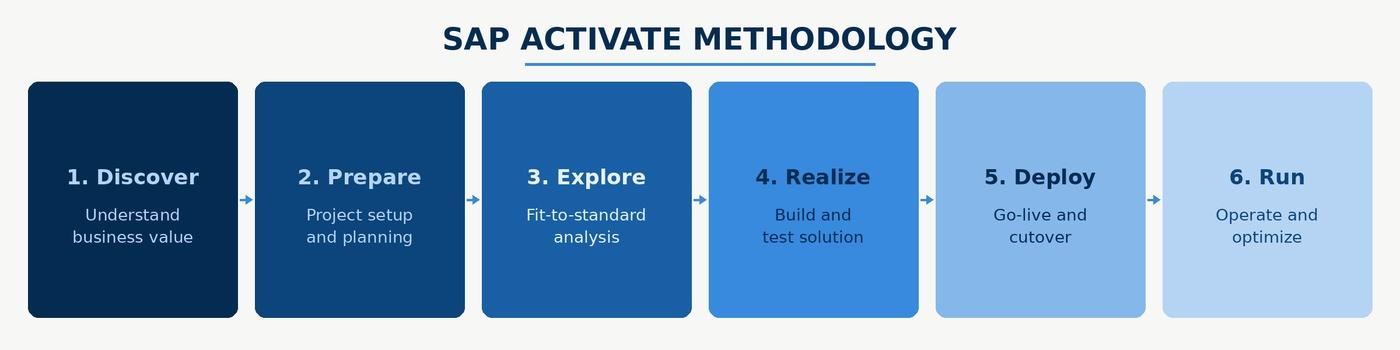
By the time the actual complexity is visible, the business is staffed for go-live and the pressure to proceed is very difficult to resist. Teams that have been through this describe a dynamic where the data quality findings are known but the remediation scope they imply isn’t politically viable to act on at that stage. As a result, exceptions get accepted and the problems migrate into the new system where they’re harder and more expensive to fix.
The organizations that avoid this outcome front-load their data investment. They run field-level profiling in the Explore phase, before the migration design is finalized, so that the complexity of the source data shapes the program plan rather than arriving as a late-stage surprise. Adopting a phased migration approach can further minimize risks and improve the overall migration process.
The Four Master Data Domains That Break First in SAP Migrations
In financial services SAP programs, there are generally four master data domains that account for the majority of cutover failures and post-go-live data issues. Let’s take a look at them in detail:
Customer master data
The SAP Business Partner object is structurally different from how most legacy core banking systems store customer data. Legacy CIFs often separate individual and organizational customer records into distinct tables, carry relationship hierarchies in formats SAP doesn’t recognize, and store identity attributes in fields whose formats were never enforced consistently. As an example, national ID fields might appear in three different formats depending on when the record was created or contact information might be split across fields that don’t map directly to SAP’s address structure.
When these records are extracted and mapped to the Business Partner structure, the transformation process encounters compounding problems. Duplicate customers that exist as separate records in the legacy system need to be resolved into single Business Partner records before load. Mandatory Business Partner fields that weren’t mandatory in the legacy CIF need to be populated so that the new SAP system has access to all of the data it needs.
The relationship structure between a customer and their accounts, policies, and products may also need to be reconstructed in SAP’s hierarchy model, which requires clean, intact referential links in the source data that may not exist. Leveraging automated mapping and data conversion tools can help ensure data accuracy by automatically aligning data fields and transforming data into compatible formats, while supporting data validation to identify errors and maintain high data quality throughout the migration of customer master data.
Banks that profile their CIF before the migration design phase know what they’re working with and can build remediation time into the program plan. On the other hand, if you ignore source data quality and defer all of this to post-migration, you’ll undoubtedly discover the duplicate rate and referential integrity gap during mock migration runs. At this stage, even if you run multiple test cycles, you’ll end up putting in twice the manual effort because there is no realistic path to full remediation before the committed cutover date.
Vendor master data
Vendor master data in financial institutions receives less attention than customer data but causes disproportionate problems at cutover. A vendor master that has accumulated duplicates over years of manual entry, with the same supplier appearing under slightly different legal entity names, different payment terms, different bank account details, and different purchase order histories, creates direct payment risk when migrated into SAP without prior deduplication.
The specific risk is duplicate payment. When two vendor records representing the same entity both migrate into SAP with open purchase orders or invoice history attached, the payment process can generate duplicate transactions before anyone identifies the underlying data problem. In a banking environment with regulatory payment accuracy requirements, that can even go so far as causing compliance issues. To prevent such issues during migration, data cleansing and maintaining data quality are critical best practices. These steps help ensure data integrity, reduce risks, and support a seamless transition to SAP systems.
Vendor deduplication is also structurally harder than customer deduplication because vendor identity attributes are less standardized. Probabilistic matching across name variants, partial tax IDs, and address fragments is necessary to surface the full duplicate population, and that matching needs to happen before extraction, not after load.
Running a SAP S/4HANA migration?
See how DataMatch Enterprise profiles and cleanses master data without disrupting the BODS or MDG workstream your system integrator has configured.
Start a Free TrialChart of accounts
Financial institutions that have grown through acquisition typically carry multiple charts of accounts from previously independent entities, each mapped inconsistently to the acquiring organisztion’s GL structure over years of partial integration. When these organizations migrate to SAP, the decision to harmonize the chart of accounts sounds straightforward in a project plan. In practice, it surfaces accounting policy decisions that no data quality tool can make automatically and that finance stakeholders are rarely available to make at the pace a migration timeline demands.
Harmonizing GL codes means mapping every account code in every source system to a target code in the SAP chart of accounts, validating that the mapping preserves the correct accounting treatment for every transaction type associated with that code, and ensuring that historical transaction data migrated against old codes is correctly reclassified in the new structure. Leveraging data transformation processes and predefined templates within SAP migration tools can streamline this harmonization by automating mapping, transformation, and validation steps, improving both efficiency and accuracy.
The data quality work that makes this tractable is upstream of the GL code mapping itself. Profiling how each source code has actually been used in transactions, identifying codes whose usage patterns suggest inconsistent treatment across entities, and producing a flagged list of mapping decisions that require finance sign-off before any data moves turns an open-ended harmonization exercise into a structured, auditable process.
Material and product master data
For banks and insurers, product master data covers the reference data describing financial products, product codes, pricing structures, and product-to-account relationships. In organizations that have added products through acquisition or built parallel product lines in separate systems, this reference data is almost always inconsistent across entities.
Product codes that overlap but represent different products, pricing attributes stored at different levels of granularity depending on the source system, and product-to-account relationships that exist in some systems but not others don’t stop a migration from completing technically. They produce a target environment where product reporting is unreliable and downstream analytics are structurally compromised from day one. Verifying data integrity is essential to ensure that all migrated data, especially transactional data, is accurate, consistent, and properly linked to the product master data, supporting smooth business operations and minimizing downtime.
Remediating product master inconsistencies requires agreement on a canonical product taxonomy before migration begins, a decision that involves product management, finance, and IT simultaneously and that tends to take longer than any of those stakeholders initially estimate.
Pre-Migration Data Quality: What to Assess Before You Move a Single Record
The purpose of pre-migration assessment is to generate findings that change the program plan, the timeline, the remediation budget, and the sequencing of workstreams. It is essential to evaluate all data sources and identify critical data that must be safeguarded during the SAP data migration process. Conducting a comprehensive data assessment to evaluate accuracy, duplication, completeness, and relevance helps identify which data is business-critical and which can be archived or discarded, reducing the risk of errors, rework, and compliance issues later in the process. Here’s what you should aim for:
Data profiling across source systems
A credible pre-migration profile covers completeness, uniqueness, and format consistency across every field that will be mapped to a SAP target field.
Completeness means measuring what percentage of records have a populated, valid value, not just a non-NULL value, but a value that conforms to the expected format and falls within an expected range. Incomplete data presents significant challenges during migration, as missing or invalid values can compromise data integrity and disrupt business processes in the new system. Profiling historical data is essential to identify and address incomplete data, ensuring that both current and legacy records meet migration readiness standards.
Uniqueness means measuring duplicate rates at the record level and at the key attribute level independently, since a population can have a low record-level duplicate rate but high duplication on specific identity attributes that drive the matching logic.
Format consistency means cataloguing every variant in which a given field appears across the source population and mapping each variant to the transformation rule that will handle it.
For financial services SAP migrations, the fields that most consistently fail SAP’s mandatory requirements are Business Partner category, legal entity type for corporate customers, country-specific tax or identity identifiers, and bank detail records for vendors and counterparties. These fields tend to have high incompleteness rates in legacy systems because they weren’t required at point of entry, and they’re required by SAP’s data model for the business processes the migration is enabling.
Identifying mandatory SAP field requirements and mapping gaps
SAP S/4HANA has documented mandatory field requirements by business process and object type. The gap analysis between those requirements and the actual content of source system fields is the most important document a data quality team produces in the pre-migration phase. It translates a technical profiling exercise into a prioritized remediation list that distinguishes between gaps that block migration entirely, gaps that create degraded functionality in the target system, and gaps that are tolerable at go-live with a documented post-cutover remediation plan.
This analysis is also where mapping assumptions get stress-tested against real data. A source field that looks like a clean match to a target field in a mapping spreadsheet may, in practice, contain values in multiple formats across the source population, some of which the transformation rule handles correctly and some of which it doesn’t. Running the transformation rules against the actual source data in a non-production environment and capturing every exception by field and by record count converts a mapping document from a design assumption into an evidence-based assessment of migration readiness.
Deduplication of Business Partner records before load
Business Partner deduplication requires matching logic that operates across multiple identity attributes simultaneously. Name matching alone will miss duplicates where names are recorded differently across source systems, whether that’s maiden names, abbreviated names, or transliterated names in multilingual environments. Address matching alone will miss duplicates where the same entity appears at different addresses in different records, or where address fields were populated inconsistently across branches.
Effective deduplication at this stage uses probabilistic matching across name, address, identity number, and date of birth in combination, with confidence-scored outputs and human-review workflows for records that fall into the probable-but-not-certain match range.
The output of this process isn’t just a merged record set. It’s a documented merge decision log that records which source records were consolidated, what matching logic was applied, and what the confidence score was for each merge decision. Internal audit and compliance functions will ask for that documentation post-migration, and in regulated financial services environments, the absence of it creates its own risk.
Address standardization for SAP compatibility
SAP’s address validation is stricter than that of most legacy banking systems. Address records that have loaded without issue into a twenty-year-old core platform will fail SAP validation if they don’t conform to country-specific format requirements, including correct street type abbreviations, valid postal code formats by country, and properly structured city and region fields. Standardization before migration means parsing address fields into SAP’s required components, applying country-specific postal format rules, and resolving the abbreviation and formatting inconsistencies that accumulate in any address dataset over time.
SAP BODS and MDG: Using Native Tools Without Drowning in Configuration
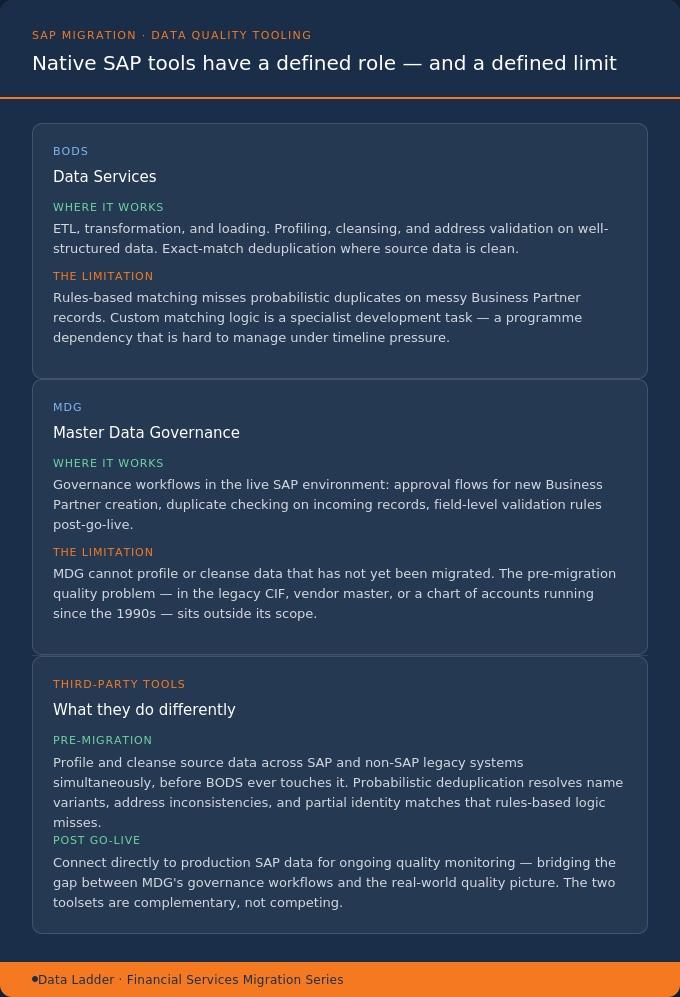
SAP Business Objects Data Services and Master Data Governance are the native tools in the SAP ecosystem for data quality work. Both are capable products. Both are also complex to configure, and their limitations in financial services migration contexts are worth understanding clearly rather than discovering mid-program.
BODS handles data extraction, transformation, and loading, and it includes data quality functions: profiling, cleansing, address validation, and matching. In practice, the data quality configuration in BODS is technically demanding and time-consuming to build correctly. For organisations whose SI has already designed the BODS workstream around ETL and transformation logic, adding extensive data quality configuration to that workstream mid-program creates scope risk, timeline risk, and regression testing complexity that most program don’t have capacity to absorb.
BODS’s matching capabilities in standard configuration are also rules-based. For straightforward exact-match deduplication on well-structured data, that’s sufficient. For probabilistic matching on Business Partner records where name variants, address inconsistencies, and partial identity attribute matches need to be resolved simultaneously, rules-based logic will miss a meaningful proportion of the duplicate population. The custom development required to close that gap in BODS is a specialist task that adds both cost and program risk, and it typically needs to be delivered by the SI rather than the data quality team, which creates a dependency that’s difficult to manage when timelines compress.
MDG, on the other hand, provides governance workflows for master data maintenance in the SAP environment, and it’s genuinely valuable for that purpose. That said, the data quality problem in a migration is in the source systems that predate SAP, the legacy CIF, the vendor master, the chart of accounts in a system that may have been running since the mid-1990s. MDG can’t profile or cleanse data that hasn’t yet been migrated. What it can do, once migration is complete, is enforce governance workflows that prevent the same data quality problems from re-emerging in the production environment: approval workflows for new Business Partner creation, duplicate checking on incoming records, and field-level validation rules that the legacy system never enforced.
Designing those MDG workflows during the migration program, before go-live, means the governance structure is in place from day one rather than being retrofitted after the first post-go-live data quality audit. That sequencing requires deliberate planning, because MDG workflow design is typically treated as a post-go-live activity in programme plans that are already under timeline pressure.
When third-party data quality tools outperform native SAP options
The case for a third-party data quality tool in a SAP migration isn’t that BODS and MDG are inadequate products. It’s that the specific combination of capabilities required for pre-migration work on financial services source data, namely probabilistic matching at scale, multi-source profiling across SAP and non-SAP systems simultaneously, address standardization across multiple country formats, and post-go-live monitoring that connects back to production SAP data, is not what BODS and MDG are optimized for.
A third-party tool operating on the source systems before extraction handles the data quality work that should happen before BODS ever sees the data, which means the transformation and load workstream the SI has configured runs against cleaner inputs. The two tools are complementary in the migration architecture rather than competing for the same workstream.
DataMatch Enterprise runs pre-migration profiling across SAP and non-SAP legacy systems, executes probabilistic deduplication on Business Partner data, and connects to SAP production for post-go-live quality monitoring, working alongside BODS and MDG rather than replacing them.
Post-Go-Live Data Quality Monitoring in SAP
Most SAP migration content stops at go-live. That’s also where most data quality problems actually surface, because testing environments never fully replicate the volume, variety, and velocity of production data, and because the organizational behavior that creates data quality problems in the first place doesn’t change at cutover. Post migration validation is critical at this stage, involving data reconciliation, functional testing, and user acceptance testing to verify data accuracy, consistency, and system functionality.
Additionally, monitoring system performance after go-live is essential to track responsiveness, efficiency, and stability, ensuring ongoing success and value realization. Reconciliation reports should be generated after each migration cycle to confirm data matches between the source and target systems, and iterative mock loads and validation are important steps to ensure data quality and accuracy before the final production cutover.
Why data quality degrades in the first 90 days post-go-live
The first 90 days post-cutover are the highest-risk period for data quality degradation in any SAP migration, and the causes are predictable. Staff trained on the new system in a controlled environment encounter edge cases in production that training didn’t cover, and their workarounds create records that don’t conform to SAP’s validation standards. In addition to this, the interfaces from systems outside the migration scope continue feeding data in formats that weren’t fully accounted for in the transformation design.
As a result, duplicate records that were present in the source data but fell below the confidence threshold during pre-migration deduplication begin accumulating in the new environment as subsequent transactions reference them.
In financial services specifically, the regulatory consequences of data quality degradation in this period are material. Customer identification records and vendor records that were compliant at go-live may no longer be compliant six weeks later if address and contact information hasn’t been maintained correctly. Beyond regulatory risks, there is also a significant risk of business disruption if critical data is not properly safeguarded during this period. Protecting critical data and implementing robust backup strategies are essential to minimize operational interruptions and ensure business continuity. These are consistent patterns in post-go-live SAP environments that weren’t set up with active quality monitoring from day one.
Setting up automated quality checks on SAP production data
Effective post-go-live monitoring requires three capabilities operating in parallel.
First, ongoing duplicate detection on Business Partner records as new data enters the system, not as a quarterly batch scan, but as a daily or near-real-time process that surfaces new duplicates before they accumulate transaction history that makes merging them operationally complex.
Second, completeness monitoring on the fields identified as problematic during pre-migration profiling, tracking whether completeness rates are improving, stable, or degrading as the business operates in the new environment.
Third, interface monitoring on every inbound data feed, confirming that data arriving from external and internal systems continues to meet the format and completeness standards established during migration.
The profiling baselines developed during pre-migration assessment become the reference point for post-go-live monitoring. A field that was 94% complete in the source system and 97% complete at go-live should, with correct governance in place, continue improving. If it drops to 88% three months post-cutover, the monitoring system surfaces that degradation before it affects downstream reporting or triggers a compliance finding.
Conclusion
SAP S/4HANA is a better platform than most alternatives for financial services organizations. The path to getting there cleanly requires acknowledging something that program plans consistently underweight: the quality of the data arriving at SAP determines the quality of what SAP delivers, regardless of how well the platform itself is configured.
The work that separates migrations that go live cleanly from those that don’t is largely invisible in project plans. Field-level profiling in the Explore phase, Business Partner deduplication before extraction, GL code harmonization decisions with finance sign-off before any data moves, and binding go/no-go criteria agreed by all involved stakeholders is key to a successful migration.
The findings that change program plans are only useful before the design is locked. Most teams discover that later than they should.
DataMatch Enterprise is free to trial on your own source data
Run DataMatch Enterprise against your source systems, in your own environment, before the data profiling phase closes.
Start a Free TrialFAQs
What are the four main types of data migration in the SAP landscape?
The four main types of data migration in SAP are Database Migration, Storage Migration, Cloud Migration, and Application Migration. Database Migration involves relocating data from one database system to another, often requiring careful planning and assessment of the target schema. Storage Migration refers to moving data between storage systems, such as from on-premises to cloud storage, to improve performance or scalability. Cloud Migration is the process of transferring data to cloud environments, offering benefits like scalability and real-time analytics. Application Migration involves moving applications and their associated data to new platforms or SAP environments.
What are the main SAP S/4HANA migration strategies and how do they differ?
The primary migration strategies are system conversion (brownfield), greenfield, and selective data transition. System conversion (brownfield) upgrades an existing SAP system to S/4HANA, preserving historical data and configurations. Greenfield involves a fresh implementation, migrating only necessary data and allowing for business process redesign. Selective data transition is a hybrid approach, enabling organizations to transfer only critical data and processes, balancing modernization with retention of essential legacy elements.
How should you prepare for a SAP data migration?
Preparation should include archiving old historical data to reduce the volume of data to transfer and ensure compliance. Using staging tables during migration allows for data transformation and validation before loading into the target system, improving error isolation. Incremental testing, such as multiple dry runs and small-batch test cycles, helps identify mapping and logic errors before the final migration.
What are the best practices for SAP data migration?
Best practices include early planning, intensive data cleansing, and rigorous testing to ensure system integrity. Treat data as a business asset, not just a technical task, and involve stakeholders early to align objectives and ensure accountability.
What should a migration project focus on for a successful SAP data migration?
A migration project should focus on planning how to transfer data, performing data conversion to ensure compatibility, and validating both technical and business processes for a well executed migration. Successful data migration requires structured phases, stakeholder involvement, and ongoing monitoring to ensure data integrity and operational efficiency.
What are the most common data quality failures in SAP S/4HANA migrations for banks and insurers?
The four domains that fail most consistently in financial services SAP migrations are customer master data (CIF-to-Business Partner mapping failures and unresolved duplicates), vendor master data (duplicate records creating payment and compliance risk), chart of accounts (GL code mapping inconsistencies across legacy entities), and product or material master data (reference data inconsistencies across business units). All four are detectable through pre-migration profiling and remediable before cutover if identified early enough in the program.
When should data deduplication happen in a SAP S/4HANA migration program?
Business Partner deduplication should be completed before the migration extraction window opens, after profiling has established duplicate rates and match confidence thresholds across the source population. Migrating duplicate Business Partner records into SAP and attempting to resolve them post-go-live creates operational risk, requires MDG workflow configuration under production conditions, and costs significantly more than pre-migration deduplication against the source system.
What are the limitations of SAP BODS for data quality in financial services migrations?
BODS handles ETL and includes data quality functions, but its matching capabilities in standard configuration are rules-based. Probabilistic matching on Business Partner records, which is necessary to catch duplicates where names and addresses vary across source systems, requires custom development that most program budgets don’t include. BODS is also most effective when receiving already-profiled and partially cleansed data rather than running data quality logic as part of the initial extraction workstream.
How should data quality monitoring work after SAP go-live?
Post-go-live monitoring should cover ongoing duplicate detection on Business Partner records as new data enters the system, completeness monitoring on fields identified as problematic during pre-migration profiling, and interface monitoring on inbound data feeds. The profiling baselines established during migration serve as the reference point for ongoing monitoring. When field completeness or duplicate rates move materially from those baselines, the monitoring system should surface that change before it affects operational KPIs or compliance reporting.